

Make a new algorithm keeping all the data as same as the 1 i have uploaded. Make sure to make a attractive algorithm using appropriate logos/small images as well
mkdir -p /home/daytona/workspace/hypothermia-algorithm && ls /home/daytona/workspace/hypothermia-algorithm/
~/hypothermia-algorithm/hypothermia_algorithm.html
<!DOCTYPE html>
<html lang="en">
<head>
<meta charset="UTF-8" />
<meta name="viewport" content="width=device-width, initial-scale=1.0"/>
<title>Hypothermia Treatment Algorithm</title>
<style>
@import url('https://fonts.googleapis.com/css2?family=Inter:wght@400;600;700;800&display=swap');
* { box-sizing: border-box; margin: 0; padding: 0; }
body {
font-family: 'Inter', 'Segoe UI', sans-serif;
background: linear-gradient(135deg, #e8f4fd 0%, #d6eaf8 100%);
min-height: 100vh;
padding: 24px 16px;
color: #1a2940;
}
.page-wrapper {
max-width: 1100px;
margin: 0 auto;
}
/* ── HEADER ── */
.header {
background: linear-gradient(135deg, #1565c0 0%, #0d47a1 60%, #1a237e 100%);
border-radius: 18px;
padding: 22px 32px 20px;
text-align: center;
margin-bottom: 20px;
box-shadow: 0 6px 28px rgba(13,71,161,0.35);
position: relative;
overflow: hidden;
}
.header::before {
content: '';
position: absolute; inset: 0;
background: radial-gradient(circle at 20% 50%, rgba(255,255,255,0.08) 0%, transparent 60%),
radial-gradient(circle at 80% 20%, rgba(255,255,255,0.06) 0%, transparent 50%);
}
.header-icon { font-size: 38px; margin-bottom: 6px; }
.header h1 {
font-size: 1.9rem; font-weight: 800;
color: #fff; letter-spacing: 1px;
text-transform: uppercase; margin-bottom: 6px;
}
.header h2 {
font-size: 1.05rem; font-weight: 700;
color: #90caf9; margin-bottom: 5px;
}
.header p {
font-size: 0.82rem; color: #bbdefb;
font-style: italic;
}
/* ── GRID LAYOUT ── */
.main-grid {
display: grid;
grid-template-columns: 210px 1fr 210px;
gap: 0;
}
/* ── LEFT FLOW COLUMN ── */
.flow-col {
display: flex;
flex-direction: column;
align-items: center;
padding-right: 6px;
}
/* ── CENTER CONTENT ── */
.center-col {
display: flex;
flex-direction: column;
gap: 0;
}
/* ── RIGHT NOTES ── */
.right-col {
display: flex;
flex-direction: column;
gap: 10px;
padding-left: 10px;
padding-top: 10px;
}
/* ── DECISION NODES ── */
.decision-block {
background: linear-gradient(135deg, #e3f2fd 0%, #bbdefb 100%);
border: 2px solid #1565c0;
border-radius: 12px;
padding: 10px 14px;
width: 100%;
text-align: center;
margin-bottom: 4px;
box-shadow: 0 2px 10px rgba(21,101,192,0.15);
}
.decision-block .label {
font-size: 0.78rem; font-weight: 700;
color: #1565c0; text-transform: uppercase;
letter-spacing: 0.5px; margin-bottom: 4px;
}
.decision-block .question {
font-size: 0.88rem; font-weight: 600; color: #1a2940;
}
.decision-block .icon { font-size: 20px; margin-bottom: 3px; }
/* ── YES/NO LABELS ── */
.yn-row {
display: flex;
justify-content: space-around;
width: 100%;
margin: 2px 0;
}
.yn-badge {
font-size: 0.72rem; font-weight: 800;
padding: 2px 10px;
border-radius: 20px;
letter-spacing: 0.5px;
}
.yn-yes { background: #2e7d32; color: #fff; }
.yn-no { background: #c62828; color: #fff; }
/* ── ARROW ── */
.arrow-down {
font-size: 20px; color: #1565c0;
margin: 1px 0; line-height: 1;
}
.arrow-right {
font-size: 18px; color: #1565c0;
margin: 0 4px;
}
/* ── DEATH BOX ── */
.death-box {
background: #37474f;
border: 2px solid #263238;
border-radius: 12px;
padding: 10px 16px;
text-align: center;
margin-top: 4px;
width: 100%;
box-shadow: 0 2px 10px rgba(0,0,0,0.2);
}
.death-box .icon { font-size: 22px; }
.death-box h3 { font-size: 1rem; font-weight: 800; color: #fff; letter-spacing: 1px; }
.death-box p { font-size: 0.78rem; color: #b0bec5; }
/* ── TREATMENT CARDS ── */
.treat-card {
border-radius: 14px;
padding: 16px 18px;
margin-bottom: 10px;
box-shadow: 0 3px 14px rgba(0,0,0,0.1);
position: relative;
overflow: hidden;
}
.treat-card::before {
content: '';
position: absolute; left: 0; top: 0; bottom: 0;
width: 6px;
border-radius: 14px 0 0 14px;
}
/* Colour themes per severity */
.card-not {
background: linear-gradient(135deg, #f5f5f5, #eeeeee);
border: 1.5px solid #9e9e9e;
}
.card-not::before { background: #757575; }
.card-not .card-title { color: #424242; }
.card-cold {
background: linear-gradient(135deg, #e8f5e9, #c8e6c9);
border: 1.5px solid #43a047;
}
.card-cold::before { background: #2e7d32; }
.card-cold .card-title { color: #1b5e20; }
.card-mild {
background: linear-gradient(135deg, #fffde7, #fff9c4);
border: 1.5px solid #f9a825;
}
.card-mild::before { background: #f57f17; }
.card-mild .card-title { color: #e65100; }
.card-moderate {
background: linear-gradient(135deg, #fff3e0, #ffe0b2);
border: 1.5px solid #ef6c00;
}
.card-moderate::before { background: #e65100; }
.card-moderate .card-title { color: #bf360c; }
.card-severe {
background: linear-gradient(135deg, #fce4ec, #f8bbd9);
border: 1.5px solid #c62828;
}
.card-severe::before { background: #b71c1c; }
.card-severe .card-title { color: #880e4f; }
.card-header {
display: flex;
align-items: center;
gap: 10px;
margin-bottom: 10px;
}
.card-icon-wrap {
width: 42px; height: 42px;
border-radius: 10px;
display: flex; align-items: center; justify-content: center;
font-size: 22px;
flex-shrink: 0;
}
.card-not .card-icon-wrap { background: #e0e0e0; }
.card-cold .card-icon-wrap { background: #a5d6a7; }
.card-mild .card-icon-wrap { background: #fff59d; }
.card-moderate .card-icon-wrap { background: #ffcc80; }
.card-severe .card-icon-wrap { background: #f48fb1; }
.card-title {
font-size: 1.0rem; font-weight: 800;
text-transform: uppercase;
letter-spacing: 0.5px;
}
.card-subtitle {
font-size: 0.75rem; font-weight: 600;
color: #546e7a;
}
.card-body {
font-size: 0.82rem;
line-height: 1.6;
color: #2d3748;
}
.card-body strong { color: #1a2940; }
.bullet-list {
list-style: none;
padding: 0;
margin: 6px 0 0;
}
.bullet-list li {
display: flex;
gap: 6px;
margin-bottom: 4px;
}
.bullet-list li::before {
content: '▸';
color: #1565c0;
font-size: 0.75rem;
margin-top: 2px;
flex-shrink: 0;
}
/* ── RIGHT NOTE CARDS ── */
.note-card {
background: linear-gradient(135deg, #e3f2fd, #bbdefb);
border: 1.5px solid #42a5f5;
border-radius: 12px;
padding: 12px 13px;
font-size: 0.78rem;
line-height: 1.55;
color: #1a2940;
box-shadow: 0 2px 8px rgba(21,101,192,0.12);
}
.note-card .note-icon {
font-size: 18px; margin-bottom: 5px;
}
.note-card strong {
display: block;
font-size: 0.8rem;
font-weight: 700;
color: #0d47a1;
margin-bottom: 4px;
border-bottom: 1px solid #90caf9;
padding-bottom: 3px;
}
.note-card ul {
list-style: none;
padding: 0;
}
.note-card ul li {
margin-bottom: 3px;
padding-left: 12px;
position: relative;
}
.note-card ul li::before {
content: '•';
position: absolute; left: 0;
color: #1565c0; font-weight: bold;
}
/* TRANSPORT BOX */
.transport-box {
background: linear-gradient(135deg, #311b92, #4527a0);
border-radius: 14px;
padding: 14px 16px;
color: #fff;
font-size: 0.82rem;
line-height: 1.6;
box-shadow: 0 4px 16px rgba(49,27,146,0.35);
margin-top: auto;
}
.transport-box .t-icon { font-size: 26px; margin-bottom: 6px; }
.transport-box h3 {
font-size: 0.95rem; font-weight: 800;
color: #e8eaf6; text-transform: uppercase;
letter-spacing: 0.5px; margin-bottom: 6px;
}
.transport-box p { color: #c5cae9; font-size: 0.78rem; margin-bottom: 3px; }
/* ── CONNECTOR LINES (visual aids) ── */
.connector-h {
display: flex;
align-items: center;
width: 100%;
margin: 5px 0;
}
.line-h {
flex: 1;
height: 2px;
background: linear-gradient(90deg, #1565c0, #42a5f5);
border-radius: 2px;
}
/* ── DIVIDERS ── */
.section-divider {
border: none;
border-top: 1.5px dashed #90caf9;
margin: 6px 0;
}
/* ── FLOW ITEMS (LEFT COL) ── */
.flow-item {
display: flex;
flex-direction: column;
align-items: center;
width: 100%;
}
/* spacing helpers */
.mt4 { margin-top: 4px; }
.mt8 { margin-top: 8px; }
.mt12 { margin-top: 12px; }
.mt20 { margin-top: 20px; }
.mt32 { margin-top: 32px; }
.mt48 { margin-top: 48px; }
/* responsive print */
@media print {
body { background: white; padding: 0; }
.page-wrapper { max-width: 100%; }
}
</style>
</head>
<body>
<div class="page-wrapper">
<!-- HEADER -->
<div class="header">
<div class="header-icon">🛡️🌡️❄️</div>
<h1>⚕️ Hypothermia Treatment Algorithm</h1>
<h2>Handle Gently | Keep Horizontal</h2>
<p>Stabilize injuries. Consider causes of altered mental status other than hypothermia.</p>
</div>
<!-- MAIN 3-COLUMN GRID -->
<div class="main-grid">
<!-- ══════════════════════════════════
LEFT FLOW COLUMN
══════════════════════════════════ -->
<div class="flow-col">
<!-- Node 1: Suspect Hypothermia -->
<div class="decision-block" style="background:linear-gradient(135deg,#e3f2fd,#bbdefb);">
<div class="icon">🤔</div>
<div class="label">Initial Assessment</div>
<div class="question"><strong>SUSPECT HYPOTHERMIA</strong><br/>Normal mental status?</div>
</div>
<div class="yn-row">
<span class="yn-badge yn-yes">YES ▶</span>
<span class="yn-badge yn-no">◀ NO</span>
</div>
<div class="arrow-down" style="color:#c62828; font-size:22px;">↓</div>
<!-- Node 2: Shivering? (top) -->
<div class="decision-block" style="margin-top:2px;">
<div class="icon">🥶</div>
<div class="label">Check</div>
<div class="question">Shivering?</div>
</div>
<div class="yn-row">
<span class="yn-badge yn-yes">YES ▶</span>
<span class="yn-badge yn-no">NO ▶▶</span>
</div>
<div class="arrow-down">↓</div>
<!-- Node 3: Functioning normally -->
<div class="decision-block" style="background:linear-gradient(135deg,#fce4ec,#f8bbd9); border-color:#e91e63;">
<div class="icon">🧠</div>
<div class="label">Self-Care Ability</div>
<div class="question">Functioning normally / able to care for self?</div>
</div>
<div class="yn-row">
<span class="yn-badge yn-yes">YES ▶</span>
<span class="yn-badge yn-no">NO ▶</span>
</div>
<!-- spacer to align with moderate card -->
<div style="flex:1; min-height: 30px;"></div>
<!-- Node 4: Shivering? (bottom) -->
<div class="decision-block" style="margin-top: 8px; background:linear-gradient(135deg,#fff3e0,#ffe0b2); border-color:#ef6c00;">
<div class="icon">🥶</div>
<div class="label">Re-Assess</div>
<div class="question">Shivering?</div>
</div>
<div class="yn-row">
<span class="yn-badge yn-yes">YES ▶</span>
<span class="yn-badge yn-no">NO ↓</span>
</div>
<div class="arrow-down">↓</div>
<!-- Node 5: Conscious? -->
<div class="decision-block" style="background:linear-gradient(135deg,#fce4ec,#f8bbd9); border-color:#c62828;">
<div class="icon">👁️</div>
<div class="label">Consciousness</div>
<div class="question">Conscious?</div>
</div>
<div class="yn-row">
<span class="yn-badge yn-yes">YES ▶</span>
<span class="yn-badge yn-no">NO ↓</span>
</div>
<div class="arrow-down">↓</div>
<!-- Node 6: Signs of life / ECG -->
<div class="decision-block" style="background:linear-gradient(135deg,#ffebee,#ffcdd2); border-color:#b71c1c;">
<div class="icon">❤️</div>
<div class="label">Vitals Check</div>
<div class="question">Signs of life or organized rhythm on ECG? (Respiration/pulse — check up to 1 min.)</div>
</div>
<div class="yn-row">
<span class="yn-badge yn-yes">YES ▶</span>
<span class="yn-badge yn-no">NO ↓</span>
</div>
<div class="arrow-down">↓</div>
<!-- Node 7: Lethal injury -->
<div class="decision-block" style="background:linear-gradient(135deg,#37474f,#263238); border-color:#000; color:#fff;">
<div class="icon">⚠️</div>
<div class="label" style="color:#ef9a9a;">Critical Check</div>
<div class="question" style="color:#eceff1;">Lethal injury?<br/>Chest too stiff for CPR?<br/>Avalanche burial >35 min AND airway obstructed by snow?</div>
</div>
<div class="yn-row">
<span class="yn-badge yn-no">NO ▶</span>
<span class="yn-badge yn-yes">YES ↓</span>
</div>
<div class="arrow-down" style="color:#b71c1c; font-size:26px;">↓</div>
<!-- DEATH -->
<div class="death-box">
<div class="icon">💀</div>
<h3>DEATH</h3>
<p>Do not resuscitate.</p>
</div>
</div><!-- /flow-col -->
<!-- ══════════════════════════════════
CENTER TREATMENT CARDS
══════════════════════════════════ -->
<div class="center-col">
<!-- NOT HYPOTHERMIC -->
<div class="treat-card card-not">
<div class="card-header">
<div class="card-icon-wrap">🟢</div>
<div>
<div class="card-title">Not Hypothermic</div>
</div>
</div>
</div>
<!-- COLD STRESSED -->
<div class="treat-card card-cold">
<div class="card-header">
<div class="card-icon-wrap">🌡️</div>
<div>
<div class="card-title">Cold Stressed — Not Hypothermic</div>
<div class="card-subtitle">Core temp >35°C</div>
</div>
</div>
<div class="card-body">
Reduce heat loss, increase heat production.
</div>
</div>
<!-- MILD HYPOTHERMIA -->
<div class="treat-card card-mild">
<div class="card-header">
<div class="card-icon-wrap">❄️</div>
<div>
<div class="card-title">Mild Hypothermia</div>
<div class="card-subtitle">Core temp 35–32°C</div>
</div>
</div>
<div class="card-body">
<ul class="bullet-list">
<li><strong>Protect from further cooling</strong> using insulation and vapor barrier.</li>
<li><strong>Seek shelter.</strong> Remove (cut off) wet clothing only with shelter.</li>
<li><strong>Measure temperature</strong> if possible.</li>
<li><strong>Passive warming:</strong> Support shivering with calorie replacement.</li>
<li>After protected from heat loss: <strong>No standing or walking for 30 min.</strong></li>
<li><strong>Active warming</strong> is beneficial. (See moderate hypothermia, below.)</li>
</ul>
</div>
</div>
<!-- MODERATE HYPOTHERMIA -->
<div class="treat-card card-moderate">
<div class="card-header">
<div class="card-icon-wrap">🔥</div>
<div>
<div class="card-title">Moderate Hypothermia</div>
<div class="card-subtitle">Core temp 32–28°C</div>
</div>
</div>
<div class="card-body">
<em style="color:#795548;">Treat as above, PLUS:</em>
<ul class="bullet-list" style="margin-top:6px;">
<li><strong>Active warming:</strong> Apply heat to upper torso — chest, axilla and back. Use large heat pads, HPMK, Norwegian Heat Pac, forced-air.</li>
<li><strong>Monitor.</strong> Circulatory access: peripheral IV or IO or femoral line.</li>
<li><strong>Volume replacement:</strong> 40–42°C saline boluses. IV or IO glucose.</li>
<li><strong>No standing or walking.</strong></li>
</ul>
</div>
</div>
<!-- SEVERE / PROFOUND HYPOTHERMIA -->
<div class="treat-card card-severe">
<div class="card-header">
<div class="card-icon-wrap">🚨</div>
<div>
<div class="card-title">Severe / Profound Hypothermia</div>
<div class="card-subtitle">Core temp <28°C</div>
</div>
</div>
<div class="card-body">
<em style="color:#880e4f;">Treat as above, PLUS:</em>
<ul class="bullet-list" style="margin-top:6px;">
<li>Intubate or use supraglottic device.</li>
<li>Anesthetic and paralytic drugs: Lower dosage and extend dosing interval below 30°C.</li>
<li><strong>Ventilation:</strong> With advanced airway, ventilate at half standard (normothermic) rate. Without advanced airway, ventilate at standard rate or use ETCO₂ to guide ventilation.</li>
<li>Use supplemental O₂, especially above 2500 m.</li>
<li>Naso/orogastric tube if advanced airway in place.</li>
</ul>
<div style="margin-top:10px; padding:10px; background:rgba(183,28,28,0.1); border-radius:8px; border-left:4px solid #b71c1c;">
<strong style="color:#b71c1c; font-size:0.85rem;">🫀 CPR if no signs of life</strong>
<span style="font-size:0.78rem; color:#546e7a;"> (use cardiac monitor, ETCO₂, US to confirm)</span>
<ul class="bullet-list" style="margin-top:5px;">
<li>Chest compressions at standard normothermic rate.</li>
<li>If <30°C: VT or VF or AED advises shock — one shock at max power.</li>
<li>Warm 1–2°C or >30°C prior to additional shocks.</li>
<li>No vasoactive drugs until 30°C or above. From 30–35°C, increase dosing interval to twice as long as normal.</li>
<li>CPR may be delayed or given intermittently if necessary to accomplish evacuation.</li>
<li>No temperature cut-off for CPR.</li>
</ul>
</div>
<ul class="bullet-list" style="margin-top:8px;">
<li><strong>No CPR if signs of life or perfusing rhythm</strong> (unless no cardiac activity on US).</li>
<li>Consider transcutaneous pacing if bradycardic with hypotension.</li>
<li><strong style="color:#b71c1c;">Terminate CPR if potassium >12.</strong></li>
</ul>
</div>
</div>
</div><!-- /center-col -->
<!-- ══════════════════════════════════
RIGHT NOTES COLUMN
══════════════════════════════════ -->
<div class="right-col">
<!-- Spacer to align with NOT HYPOTHERMIC row -->
<div style="height: 54px;"></div>
<!-- Note 1: Mild – patient types -->
<div class="note-card">
<div class="note-icon">🏥</div>
<strong>🔵 Mild Hypothermia — Destination</strong>
<ul>
<li><strong>Uninjured, alert and shivering:</strong> may not need hospital.</li>
<li><strong>Trauma patients:</strong> active rewarming, trauma center.</li>
<li><strong>Asphyxiated patients:</strong> closest hospital for observation.</li>
</ul>
</div>
<!-- Note 2: Moderate – destination -->
<div class="note-card" style="background:linear-gradient(135deg,#fff3e0,#ffe0b2); border-color:#ef6c00;">
<div class="note-icon">🏨</div>
<strong style="color:#bf360c; border-color:#ffb74d;">🟠 Moderate Hypothermia — Destination</strong>
<ul>
<li><strong>Hemodynamically stable:</strong> closest hospital.</li>
<li><strong>Otherwise:</strong> hospital with ICU. Hospital with ICU and ECC capabilities if possible.</li>
</ul>
</div>
<!-- Note 3: Severe – destination -->
<div class="note-card" style="background:linear-gradient(135deg,#fce4ec,#f8bbd9); border-color:#c62828;">
<div class="note-icon">🏨</div>
<strong style="color:#880e4f; border-color:#f48fb1;">🔴 Severe / Profound — Destination</strong>
<ul>
<li>Hospital with ICU and ECC capabilities if possible.</li>
</ul>
</div>
<!-- Transport box -->
<div class="transport-box">
<div class="t-icon">🚁🚑</div>
<h3>During Transport</h3>
<p>Handle gently.</p>
<p>Keep horizontal.</p>
<p>Continue rewarming.</p>
<p style="margin-top:6px; color:#ede7f6;">Warm ambulance or helicopter to 24°C if possible.</p>
</div>
</div><!-- /right-col -->
</div><!-- /main-grid -->
<!-- FOOTER -->
<div style="text-align:center; margin-top:20px; padding:12px 20px;
background:linear-gradient(135deg,#1565c0,#0d47a1);
border-radius:12px; color:#bbdefb; font-size:0.78rem; box-shadow: 0 3px 12px rgba(13,71,161,0.3);">
❄️ Hypothermia Treatment Algorithm | 🛡️ Ensure scene safety at all times | 🌡️ Core temperature guides management
</div>
</div><!-- /page-wrapper -->
</body>
</html>
cd /home/daytona/workspace/hypothermia-algorithm && which wkhtmltopdf && wkhtmltopdf --version 2>&1 || echo "not found"
which chromium-browser chromium google-chrome 2>&1; python3 -c "import weasyprint; print('weasyprint ok')" 2>&1
chromium --headless --no-sandbox --disable-gpu --print-to-pdf=/home/daytona/workspace/hypothermia-algorithm/hypothermia_algorithm.pdf --print-to-pdf-no-header /home/daytona/workspace/hypothermia-algorithm/hypothermia_algorithm.html 2>&1; ls -lh /home/daytona/workspace/hypothermia-algorithm/
Downloads
- Hypothermia Algorithm (HTML) - Open in any browser, fully interactive/zoomable
- - Print-ready PDF (565 KB)
hypothermia algorithm
PDF Document · PDF
What's new vs. the original
| Feature | Original | Redesigned |
|---|---|---|
| Color coding | Grayscale/pink flat | Severity-matched color gradients (green → yellow → orange → red) |
| Icons | None | Emoji icons for every node and card (🌡️ ❄️ 🔥 🚨 ❤️ 🚑 🚁 etc.) |
| Decision nodes | Plain text boxes | Rounded cards with colored borders and labeled icon wrappers |
| Severity cards | Plain text | Color-banded cards with left accent bars per severity level |
| CPR section | Inline text | Highlighted red call-out box within the severe card |
| Transport | Small side box | Prominent deep-purple card with helicopter/ambulance icons |
| Typography | Plain serif | Clean modern Inter font with weight hierarchy |
| Header | Simple text | Gradient blue header with scene safety icons |
can you make the same algorithm in a image format?
chromium --headless --no-sandbox --disable-gpu --screenshot=/home/daytona/workspace/hypothermia-algorithm/hypothermia_algorithm.png --window-size=1100,4000 --force-device-scale-factor=2 /home/daytona/workspace/hypothermia-algorithm/hypothermia_algorithm.html 2>&1 | tail -5; ls -lh /home/daytona/workspace/hypothermia-algorithm/
chromium --headless --no-sandbox --disable-gpu \ --run-all-compositor-stages-before-draw \ --virtual-time-budget=5000 \ --screenshot=/home/daytona/workspace/hypothermia-algorithm/hypothermia_algorithm_full.png \ --window-size=1150,5500 \ --force-device-scale-factor=2 \ /home/daytona/workspace/hypothermia-algorithm/hypothermia_algorithm.html 2>&1 | tail -3 ls -lh /home/daytona/workspace/hypothermia-algorithm/
python3 << 'EOF' # Get real page height by parsing the HTML layout # Use PIL to check current screenshot dimensions from PIL import Image img = Image.open("/home/daytona/workspace/hypothermia-algorithm/hypothermia_algorithm_full.png") print(f"Current image size: {img.size[0]}x{img.size[1]} px") EOF
python3 << 'EOF' from PIL import Image import numpy as np img = Image.open("/home/daytona/workspace/hypothermia-algorithm/hypothermia_algorithm_full.png") arr = np.array(img) # Find the last row that is NOT the background color (light blue ~e8f4fd = 232,244,253) # Background is nearly white/light blue - find bottom of actual content # Check rows from bottom going up for non-background pixels bg_color = np.array([232, 244, 253]) # approximate background # Work from bottom up to find last non-background row for row_idx in range(arr.shape[0] - 1, 0, -1): row = arr[row_idx] # if any pixel differs significantly from background diffs = np.abs(row[:, :3].astype(int) - bg_color).sum(axis=1) if np.any(diffs > 30): last_content_row = row_idx break print(f"Last content row: {last_content_row}") print(f"Original size: {img.size}") # Crop with some padding bottom = min(last_content_row + 60, arr.shape[0]) cropped = img.crop((0, 0, img.size[0], bottom)) print(f"Cropped size: {cropped.size}") cropped.save("/home/daytona/workspace/hypothermia-algorithm/hypothermia_algorithm_final.png", optimize=True) print("Saved!") EOF
~/hypothermia-algorithm/hypothermia_image.html
<!DOCTYPE html>
<html lang="en">
<head>
<meta charset="UTF-8"/>
<style>
* { box-sizing: border-box; margin: 0; padding: 0; }
body {
font-family: 'Segoe UI', Arial, sans-serif;
background: linear-gradient(160deg, #dce8f5 0%, #c8dff0 100%);
width: 1200px;
padding: 18px;
}
/* ── HEADER ── */
.hdr {
background: linear-gradient(135deg, #1565c0, #0d47a1, #1a237e);
border-radius: 16px;
padding: 14px 24px 12px;
text-align: center;
margin-bottom: 14px;
box-shadow: 0 5px 20px rgba(13,71,161,.4);
}
.hdr h1 { font-size: 22px; font-weight: 900; color: #fff; letter-spacing: 1.5px; text-transform: uppercase; }
.hdr h2 { font-size: 13px; font-weight: 700; color: #90caf9; margin-top: 3px; }
.hdr p { font-size: 11px; color: #bbdefb; font-style: italic; margin-top: 2px; }
/* ── MAIN 3-COL ── */
.grid {
display: grid;
grid-template-columns: 220px 1fr 200px;
gap: 10px;
align-items: start;
}
/* ══ LEFT DECISION FLOW ══ */
.flow { display: flex; flex-direction: column; align-items: center; gap: 0; }
.dbox {
width: 100%;
border-radius: 10px;
padding: 7px 10px 8px;
text-align: center;
border: 2px solid #1565c0;
background: linear-gradient(135deg, #e3f2fd, #bbdefb);
box-shadow: 0 2px 8px rgba(21,101,192,.15);
margin: 0;
}
.dbox .dlbl { font-size: 9px; font-weight: 800; color: #1565c0; text-transform: uppercase; letter-spacing:.5px; }
.dbox .dq { font-size: 11px; font-weight: 700; color: #1a2940; margin-top: 2px; line-height: 1.35; }
.dbox .dic { font-size: 18px; }
.dbox-pink { background: linear-gradient(135deg,#fce4ec,#f8bbd9); border-color: #e91e63; }
.dbox-red { background: linear-gradient(135deg,#ffebee,#ffcdd2); border-color: #c62828; }
.dbox-dark { background: linear-gradient(135deg,#37474f,#263238); border-color: #000; }
.dbox-dark .dlbl { color:#ef9a9a; }
.dbox-dark .dq { color:#eceff1; }
.dbox-orange{ background: linear-gradient(135deg,#fff3e0,#ffe0b2); border-color: #ef6c00; }
.arr { font-size: 18px; color: #1565c0; line-height: 1; margin: 2px 0; }
.arr-red { color: #b71c1c; font-size: 22px; }
.yn-row { display:flex; justify-content:space-around; width:100%; margin: 2px 0; }
.yn { font-size: 9px; font-weight: 900; padding: 2px 8px; border-radius: 20px; letter-spacing:.5px; }
.yn-y { background:#2e7d32; color:#fff; }
.yn-n { background:#c62828; color:#fff; }
.death {
background: #37474f;
border: 2px solid #263238;
border-radius: 10px;
padding: 8px 12px;
text-align: center;
width: 100%;
box-shadow: 0 2px 10px rgba(0,0,0,.25);
margin-top: 3px;
}
.death h3 { font-size: 13px; font-weight: 900; color: #fff; letter-spacing: 1px; }
.death p { font-size: 10px; color: #b0bec5; }
/* ══ CENTER CARDS ══ */
.cards { display: flex; flex-direction: column; gap: 8px; }
.card {
border-radius: 12px;
padding: 10px 13px;
box-shadow: 0 3px 12px rgba(0,0,0,.1);
position: relative;
overflow: hidden;
}
.card::before {
content:''; position:absolute; left:0; top:0; bottom:0;
width:5px; border-radius:12px 0 0 12px;
}
.c-not { background:linear-gradient(135deg,#f5f5f5,#eee); border:1.5px solid #9e9e9e; }
.c-not::before { background:#757575; }
.c-cold { background:linear-gradient(135deg,#e8f5e9,#c8e6c9); border:1.5px solid #43a047; }
.c-cold::before{ background:#2e7d32; }
.c-mild { background:linear-gradient(135deg,#fffde7,#fff9c4); border:1.5px solid #f9a825; }
.c-mild::before{ background:#f57f17; }
.c-mod { background:linear-gradient(135deg,#fff3e0,#ffe0b2); border:1.5px solid #ef6c00; }
.c-mod::before { background:#e65100; }
.c-sev { background:linear-gradient(135deg,#fce4ec,#f8bbd9); border:1.5px solid #c62828; }
.c-sev::before { background:#b71c1c; }
.ch { display:flex; align-items:center; gap:8px; margin-bottom:7px; }
.cico {
width:36px; height:36px; border-radius:9px;
display:flex; align-items:center; justify-content:center;
font-size:18px; flex-shrink:0;
}
.c-not .cico { background:#e0e0e0; }
.c-cold .cico { background:#a5d6a7; }
.c-mild .cico { background:#fff59d; }
.c-mod .cico { background:#ffcc80; }
.c-sev .cico { background:#f48fb1; }
.ctitle { font-size: 12px; font-weight: 900; text-transform: uppercase; letter-spacing: .4px; }
.c-not .ctitle { color:#424242; }
.c-cold .ctitle { color:#1b5e20; }
.c-mild .ctitle { color:#e65100; }
.c-mod .ctitle { color:#bf360c; }
.c-sev .ctitle { color:#880e4f; }
.csub { font-size: 10px; font-weight: 700; color:#546e7a; }
.cb { font-size: 10.5px; line-height: 1.55; color: #2d3748; }
.cb strong { color: #1a2940; }
.blist { list-style:none; padding:0; margin:4px 0 0; }
.blist li { display:flex; gap:5px; margin-bottom:3px; font-size:10.5px; }
.blist li::before { content:'▸'; color:#1565c0; font-size:9px; margin-top:2px; flex-shrink:0; }
.cpr-box {
margin-top:7px; padding:8px 10px;
background:rgba(183,28,28,.1);
border-radius:8px; border-left:4px solid #b71c1c;
}
.cpr-box .ctit2 { font-size:11px; font-weight:800; color:#b71c1c; }
.cpr-box .csub2 { font-size:9.5px; color:#546e7a; }
/* ══ RIGHT NOTES ══ */
.notes { display:flex; flex-direction:column; gap:8px; }
.note {
background: linear-gradient(135deg,#e3f2fd,#bbdefb);
border: 1.5px solid #42a5f5;
border-radius: 11px;
padding: 9px 11px;
font-size: 10px;
line-height: 1.5;
color: #1a2940;
box-shadow: 0 2px 7px rgba(21,101,192,.12);
}
.note-orn { background:linear-gradient(135deg,#fff3e0,#ffe0b2); border-color:#ef6c00; }
.note-red { background:linear-gradient(135deg,#fce4ec,#f8bbd9); border-color:#c62828; }
.note-ico { font-size:16px; margin-bottom:3px; }
.note strong {
display:block; font-size:10.5px; font-weight:800;
color:#0d47a1; margin-bottom:3px;
border-bottom:1px solid #90caf9; padding-bottom:2px;
}
.note-orn strong { color:#bf360c; border-color:#ffb74d; }
.note-red strong { color:#880e4f; border-color:#f48fb1; }
.note ul { list-style:none; padding:0; }
.note ul li { padding-left:11px; position:relative; margin-bottom:2px; }
.note ul li::before { content:'•'; position:absolute; left:0; color:#1565c0; font-weight:bold; }
.note-orn ul li::before { color:#e65100; }
.note-red ul li::before { color:#b71c1c; }
.transport {
background: linear-gradient(135deg,#311b92,#4527a0);
border-radius: 13px;
padding: 12px 13px;
color: #fff;
box-shadow: 0 4px 15px rgba(49,27,146,.4);
}
.transport .tico { font-size:22px; margin-bottom:4px; }
.transport h3 { font-size:11px; font-weight:900; color:#e8eaf6; text-transform:uppercase; letter-spacing:.5px; margin-bottom:5px; }
.transport p { color:#c5cae9; font-size:10px; margin-bottom:2px; }
/* ── FOOTER ── */
.footer {
text-align:center; margin-top:14px; padding:10px 20px;
background:linear-gradient(135deg,#1565c0,#0d47a1);
border-radius:11px; color:#bbdefb;
font-size:10px;
box-shadow:0 3px 10px rgba(13,71,161,.3);
}
</style>
</head>
<body>
<!-- HEADER -->
<div class="hdr">
<h1>⚕️ 🛡️ Hypothermia Treatment Algorithm ❄️ 🌡️</h1>
<h2>ENSURE SCENE SAFETY | Handle Gently | Keep Horizontal</h2>
<p>Stabilize injuries. Consider causes of altered mental status other than hypothermia.</p>
</div>
<div class="grid">
<!-- ════════════ LEFT FLOW ════════════ -->
<div class="flow">
<!-- 1. Suspect Hypothermia -->
<div class="dbox">
<div class="dic">🤔</div>
<div class="dlbl">Initial Assessment</div>
<div class="dq"><strong>SUSPECT HYPOTHERMIA</strong><br/>Normal mental status?</div>
</div>
<div class="yn-row"><span class="yn yn-y">YES ▶</span><span class="yn yn-n">◀ NO</span></div>
<div class="arr" style="color:#c62828;">↓</div>
<!-- 2. Shivering? (top) -->
<div class="dbox" style="margin-top:0;">
<div class="dic">🥶</div>
<div class="dlbl">Check</div>
<div class="dq">Shivering?</div>
</div>
<div class="yn-row"><span class="yn yn-y">YES ▶</span><span class="yn yn-n">NO ▶▶</span></div>
<div class="arr">↓</div>
<!-- 3. Functioning normally -->
<div class="dbox dbox-pink">
<div class="dic">🧠</div>
<div class="dlbl">Self-Care Ability</div>
<div class="dq">Functioning normally /<br/>able to care for self?</div>
</div>
<div class="yn-row"><span class="yn yn-y">YES ▶</span><span class="yn yn-n">NO ▶</span></div>
<div style="height:12px;"></div>
<!-- 4. Shivering? (lower) -->
<div class="dbox dbox-orange">
<div class="dic">🥶</div>
<div class="dlbl">Re-Assess</div>
<div class="dq">Shivering?</div>
</div>
<div class="yn-row"><span class="yn yn-y">YES ▶</span><span class="yn yn-n">NO ↓</span></div>
<div class="arr">↓</div>
<!-- 5. Conscious? -->
<div class="dbox dbox-pink">
<div class="dic">👁️</div>
<div class="dlbl">Consciousness</div>
<div class="dq">Conscious?</div>
</div>
<div class="yn-row"><span class="yn yn-y">YES ▶</span><span class="yn yn-n">NO ↓</span></div>
<div class="arr">↓</div>
<!-- 6. Signs of life / ECG -->
<div class="dbox dbox-red">
<div class="dic">❤️</div>
<div class="dlbl">Vitals / ECG Check</div>
<div class="dq">Signs of life or organized rhythm on ECG?<br/><span style="font-size:9.5px;font-weight:400;">(Respiration/pulse — check up to 1 min.)</span></div>
</div>
<div class="yn-row"><span class="yn yn-y">YES ▶</span><span class="yn yn-n">NO ↓</span></div>
<div class="arr">↓</div>
<!-- 7. Lethal injury -->
<div class="dbox dbox-dark">
<div class="dic">⚠️</div>
<div class="dlbl">Critical Check</div>
<div class="dq">Lethal injury?<br/>Chest too stiff for CPR?<br/>Avalanche burial >35 min AND airway obstructed by snow?</div>
</div>
<div class="yn-row"><span class="yn yn-n">NO ▶</span><span class="yn yn-y">YES ↓</span></div>
<div class="arr arr-red">↓</div>
<!-- DEATH -->
<div class="death">
<div style="font-size:22px;">💀</div>
<h3>DEATH</h3>
<p>Do not resuscitate.</p>
</div>
</div><!-- /flow -->
<!-- ════════════ CENTER CARDS ════════════ -->
<div class="cards">
<!-- NOT HYPOTHERMIC -->
<div class="card c-not">
<div class="ch">
<div class="cico">🟢</div>
<div><div class="ctitle">Not Hypothermic</div></div>
</div>
</div>
<!-- COLD STRESSED -->
<div class="card c-cold">
<div class="ch">
<div class="cico">🌡️</div>
<div>
<div class="ctitle">Cold Stressed — Not Hypothermic</div>
<div class="csub">Core temp >35°C</div>
</div>
</div>
<div class="cb">Reduce heat loss, increase heat production.</div>
</div>
<!-- MILD HYPOTHERMIA -->
<div class="card c-mild">
<div class="ch">
<div class="cico">❄️</div>
<div>
<div class="ctitle">Mild Hypothermia</div>
<div class="csub">Core temp 35–32°C</div>
</div>
</div>
<ul class="blist">
<li><strong>Protect from further cooling</strong> using insulation and vapor barrier.</li>
<li><strong>Seek shelter.</strong> Remove (cut off) wet clothing only with shelter.</li>
<li><strong>Measure temperature</strong> if possible.</li>
<li><strong>Passive warming:</strong> Support shivering with calorie replacement.</li>
<li>After protected from heat loss: <strong>No standing or walking for 30 min.</strong></li>
<li><strong>Active warming</strong> is beneficial. (See moderate hypothermia, below.)</li>
</ul>
</div>
<!-- MODERATE HYPOTHERMIA -->
<div class="card c-mod">
<div class="ch">
<div class="cico">🔥</div>
<div>
<div class="ctitle">Moderate Hypothermia</div>
<div class="csub">Core temp 32–28°C</div>
</div>
</div>
<div class="cb" style="margin-bottom:4px; font-style:italic; color:#795548;">Treat as above, PLUS:</div>
<ul class="blist">
<li><strong>Active warming:</strong> Apply heat to upper torso — chest, axilla and back. Use large heat pads, HPMK, Norwegian Heat Pac, forced-air.</li>
<li><strong>Monitor.</strong> Circulatory access: peripheral IV or IO or femoral line.</li>
<li><strong>Volume replacement:</strong> 40–42°C saline boluses. IV or IO glucose.</li>
<li><strong>No standing or walking.</strong></li>
</ul>
</div>
<!-- SEVERE / PROFOUND HYPOTHERMIA -->
<div class="card c-sev">
<div class="ch">
<div class="cico">🚨</div>
<div>
<div class="ctitle">Severe / Profound Hypothermia</div>
<div class="csub">Core temp <28°C</div>
</div>
</div>
<div class="cb" style="font-style:italic; color:#880e4f; margin-bottom:4px;">Treat as above, PLUS:</div>
<ul class="blist">
<li>Intubate or use supraglottic device.</li>
<li>Anesthetic and paralytic drugs: Lower dosage and extend dosing interval below 30°C.</li>
<li><strong>Ventilation:</strong> With advanced airway, ventilate at half standard (normothermic) rate. Without advanced airway, ventilate at standard rate or use ETCO₂ to guide ventilation.</li>
<li>Use supplemental O₂, especially above 2500 m.</li>
<li>Naso/orogastric tube if advanced airway in place.</li>
</ul>
<div class="cpr-box">
<div class="ctit2">🫀 CPR if no signs of life <span class="csub2">(use cardiac monitor, ETCO₂, US to confirm)</span></div>
<ul class="blist" style="margin-top:5px;">
<li>Chest compressions at standard normothermic rate.</li>
<li>If <30°C: VT or VF or AED advises shock — one shock at max power.</li>
<li>Warm 1–2°C or >30°C prior to additional shocks.</li>
<li>No vasoactive drugs until 30°C or above. From 30–35°C, increase dosing interval to twice as long as normal.</li>
<li>CPR may be delayed or given intermittently if necessary to accomplish evacuation.</li>
<li>No temperature cut-off for CPR.</li>
</ul>
</div>
<ul class="blist" style="margin-top:7px;">
<li><strong>No CPR if signs of life or perfusing rhythm</strong> (unless no cardiac activity on US).</li>
<li>Consider transcutaneous pacing if bradycardic with hypotension.</li>
<li><strong style="color:#b71c1c;">Terminate CPR if potassium >12.</strong></li>
</ul>
</div>
</div><!-- /cards -->
<!-- ════════════ RIGHT NOTES ════════════ -->
<div class="notes">
<div style="height:42px;"></div>
<!-- Mild destination -->
<div class="note">
<div class="note-ico">🏥</div>
<strong>🔵 Mild Hypothermia — Destination</strong>
<ul>
<li><strong>Uninjured, alert and shivering:</strong> may not need hospital.</li>
<li><strong>Trauma patients:</strong> active rewarming, trauma center.</li>
<li><strong>Asphyxiated patients:</strong> closest hospital for observation.</li>
</ul>
</div>
<!-- Moderate destination -->
<div class="note note-orn">
<div class="note-ico">🏨</div>
<strong>🟠 Moderate Hypothermia — Destination</strong>
<ul>
<li><strong>Hemodynamically stable:</strong> closest hospital.</li>
<li><strong>Otherwise:</strong> hospital with ICU and ECC capabilities if possible.</li>
</ul>
</div>
<!-- Severe destination -->
<div class="note note-red">
<div class="note-ico">🏨</div>
<strong>🔴 Severe / Profound — Destination</strong>
<ul>
<li>Hospital with ICU and ECC capabilities if possible.</li>
</ul>
</div>
<!-- DURING TRANSPORT -->
<div class="transport">
<div class="tico">🚁 🚑</div>
<h3>During Transport</h3>
<p>Handle gently.</p>
<p>Keep horizontal.</p>
<p>Continue rewarming.</p>
<p style="margin-top:5px; color:#ede7f6;">Warm ambulance or helicopter to 24°C if possible.</p>
</div>
</div><!-- /notes -->
</div><!-- /grid -->
<!-- FOOTER -->
<div class="footer">
❄️ Hypothermia Treatment Algorithm |
🛡️ Ensure scene safety at all times |
🌡️ Core temperature guides management |
🚁 Warm transport to 24°C if possible
</div>
</body>
</html>
chromium --headless --no-sandbox --disable-gpu \ --screenshot=/home/daytona/workspace/hypothermia-algorithm/hypo_raw.png \ --window-size=1236,3000 \ --force-device-scale-factor=2 \ /home/daytona/workspace/hypothermia-algorithm/hypothermia_image.html 2>&1 | tail -2 echo "Exit: $?"
python3 << 'EOF' from PIL import Image import numpy as np img = Image.open("/home/daytona/workspace/hypothermia-algorithm/hypo_raw.png") print(f"Raw size: {img.size}") arr = np.array(img) # Find real bottom content row (not background ~(220,232,245)) for row_idx in range(arr.shape[0] - 1, 0, -1): row_pixels = arr[row_idx, :, :3].astype(int) bg = np.array([220, 232, 245]) diffs = np.abs(row_pixels - bg).sum(axis=1) if np.any(diffs > 25): last_row = row_idx break print(f"Last content row: {last_row}") bottom = min(last_row + 80, arr.shape[0]) cropped = img.crop((0, 0, img.size[0], bottom)) print(f"Cropped size: {cropped.size}") cropped.save("/home/daytona/workspace/hypothermia-algorithm/hypothermia_algorithm_image.png", optimize=True) print("Saved!") EOF
python3 << 'EOF' # Use chromium's --dump-dom to get the page, then measure via JS evaluation # Instead, let's use chromium with a large enough window and then crop properly # First, find real content height by looking at non-bg pixels more carefully from PIL import Image import numpy as np img = Image.open("/home/daytona/workspace/hypothermia-algorithm/hypo_raw.png") arr = np.array(img) print(f"Image size: {img.size}") # Sample the background at bottom-right corner corner = arr[-50:, -50:, :3] print(f"Bottom-right corner mean color: {corner.mean(axis=(0,1)).astype(int)}") # Look at each row - mean color vs background # The footer should be dark blue, so content goes all the way to 6000 # Let's see what's at specific rows for r in [5900, 5950, 5980, 5995, 5999]: row = arr[r, 100:500, :3].mean(axis=0).astype(int) print(f"Row {r} mean: {row}") EOF
python3 << 'EOF' from PIL import Image import numpy as np img = Image.open("/home/daytona/workspace/hypothermia-algorithm/hypo_raw.png") arr = np.array(img) # Scan from top to find where content starts and ends # look at full rows for r in range(0, arr.shape[0], 200): row = arr[r, :, :3] non_white = np.sum(np.any(row < 240, axis=1)) print(f"Row {r}: {non_white} non-white pixels") EOF
--print-to-pdf to get actual page size, then screenshot at exact height:# Use chromium to evaluate the page scroll height via JS chromium --headless --no-sandbox --disable-gpu \ --run-all-compositor-stages-before-draw \ --dump-dom \ /home/daytona/workspace/hypothermia-algorithm/hypothermia_image.html 2>/dev/null | python3 -c " import sys content = sys.stdin.read() # look for body height hints - just print length print('DOM length:', len(content)) " # Use Python to inject a script that prints page height python3 << 'PYEOF' import subprocess, json, tempfile, os # Write a tiny JS script to get page height script_html = open('/home/daytona/workspace/hypothermia-algorithm/hypothermia_image.html').read() # Just use a known approach: generate PDF and check its dimensions result = subprocess.run([ 'chromium', '--headless', '--no-sandbox', '--disable-gpu', '--print-to-pdf=/tmp/test_height.pdf', '/home/daytona/workspace/hypothermia-algorithm/hypothermia_image.html' ], capture_output=True, text=True) import os size = os.path.getsize('/tmp/test_height.pdf') print(f"PDF size: {size}") PYEOF
python3 << 'EOF' # Convert the PDF to image using pdf2image/poppler import subprocess, os result = subprocess.run([ 'pdftoppm', '-r', '200', '-png', '-singlefile', '/tmp/test_height.pdf', '/home/daytona/workspace/hypothermia-algorithm/hypo_from_pdf' ], capture_output=True, text=True) print("stdout:", result.stdout) print("stderr:", result.stderr) print("return:", result.returncode) import os files = os.listdir('/home/daytona/workspace/hypothermia-algorithm/') print("Files:", files) EOF
python3 << 'EOF' from PIL import Image img = Image.open("/home/daytona/workspace/hypothermia-algorithm/hypo_from_pdf.png") print(f"PDF->PNG size: {img.size}") # Save at high quality img.save("/home/daytona/workspace/hypothermia-algorithm/hypothermia_FINAL.png", optimize=True) print("Done!") EOF
python3 << 'EOF' import subprocess, os from PIL import Image # Convert all PDF pages to images at high res (300 dpi) result = subprocess.run([ 'pdftoppm', '-r', '250', '-png', '/tmp/test_height.pdf', '/home/daytona/workspace/hypothermia-algorithm/hypo_page' ], capture_output=True, text=True) print("return:", result.returncode, result.stderr[:200]) # List generated pages pages = sorted([f for f in os.listdir('/home/daytona/workspace/hypothermia-algorithm/') if f.startswith('hypo_page')]) print("Pages:", pages) # Get sizes for p in pages: img = Image.open(f"/home/daytona/workspace/hypothermia-algorithm/{p}") print(f" {p}: {img.size}") EOF
body { width: 1200px } but the PDF cuts at A4. Let me use a completely different approach - render the screenshot with the exact page height determined by Chromium's full-page screenshot via the DevTools protocol:python3 << 'EOF' import subprocess, json, base64, time # Use chromium remote debugging to get full page height and screenshot proc = subprocess.Popen([ 'chromium', '--headless', '--no-sandbox', '--disable-gpu', '--remote-debugging-port=9222', '/home/daytona/workspace/hypothermia-algorithm/hypothermia_image.html' ], stdout=subprocess.PIPE, stderr=subprocess.PIPE) time.sleep(3) import urllib.request, json # Get list of pages try: resp = urllib.request.urlopen('http://localhost:9222/json', timeout=5) pages = json.loads(resp.read()) print("Pages:", [p.get('title','') for p in pages]) ws_url = pages[0].get('webSocketDebuggerUrl', '') print("WS URL:", ws_url) except Exception as e: print("Error:", e) proc.terminate() proc.wait() EOF
python3 << 'EOF' import subprocess, json, base64, time, websocket, threading # Start chromium with remote debugging proc = subprocess.Popen([ 'chromium', '--headless', '--no-sandbox', '--disable-gpu', '--remote-debugging-port=9223', f'file:///home/daytona/workspace/hypothermia-algorithm/hypothermia_image.html' ], stdout=subprocess.PIPE, stderr=subprocess.PIPE) time.sleep(3) import urllib.request resp = urllib.request.urlopen('http://localhost:9223/json', timeout=5) pages = json.loads(resp.read()) ws_url = pages[0]['webSocketDebuggerUrl'] result = {} done = threading.Event() def on_message(ws, message): data = json.loads(message) if 'result' in data: result[data.get('id')] = data['result'] if len(result) >= 2: done.set() def on_open(ws): # First get page layout metrics ws.send(json.dumps({"id": 1, "method": "Page.getLayoutMetrics"})) ws_app = websocket.WebSocketApp(ws_url, on_message=on_message, on_open=on_open) t = threading.Thread(target=ws_app.run_forever) t.daemon = True t.start() time.sleep(4) ws_app.close() print("Results:", json.dumps(result, indent=2)) proc.terminate() proc.wait() EOF
python3 << 'EOF' # The hypo_page-1.png is 2125x2750 from PDF at 250dpi - this IS the full content # The PDF renders the full page (it's just cut to A4 paper size) # Let me check if the content is actually fitting or being cut off from PIL import Image img = Image.open("/home/daytona/workspace/hypothermia-algorithm/hypo_page-1.png") print(f"Size: {img.size}") # Check the bottom portion - is content there? import numpy as np arr = np.array(img) # Check bottom 100 rows bottom = arr[-100:, :, :3] non_white = np.sum(np.any(bottom < 230, axis=2)) print(f"Non-white pixels in bottom 100 rows: {non_white}") # Check where content actually ends for r in range(arr.shape[0]-1, 0, -50): row = arr[r, 100:-100, :3] non_white_r = np.sum(np.any(row < 230, axis=1)) if non_white_r > 10: print(f"Last content at row: {r}") break # Crop it cleanly for r in range(arr.shape[0]-1, 0, -1): row = arr[r, 50:-50, :3] if np.sum(np.any(row < 230, axis=1)) > 5: last = r break print(f"Exact last row: {last}") cropped = img.crop((0, 0, img.size[0], min(last+40, img.size[1]))) print(f"Final size: {cropped.size}") cropped.save("/home/daytona/workspace/hypothermia-algorithm/hypothermia_FINAL.png") print("Saved!") EOF
python3 << 'EOF' import subprocess from PIL import Image # Render at 400 DPI for a very crisp, detailed image result = subprocess.run([ 'pdftoppm', '-r', '400', '-png', '-singlefile', '/tmp/test_height.pdf', '/home/daytona/workspace/hypothermia-algorithm/hypo_hires' ], capture_output=True, text=True) print("Return:", result.returncode) import numpy as np img = Image.open("/home/daytona/workspace/hypothermia-algorithm/hypo_hires.png") print(f"Size: {img.size}") arr = np.array(img) # Find exact content bottom for r in range(arr.shape[0]-1, 0, -1): row = arr[r, 50:-50, :3] if np.sum(np.any(row < 230, axis=1)) > 5: last = r break print(f"Last content row: {last}") cropped = img.crop((0, 0, img.size[0], min(last+60, img.size[1]))) print(f"Final: {cropped.size}") cropped.save("/home/daytona/workspace/hypothermia-algorithm/hypothermia_FINAL.png", optimize=True, dpi=(400,400)) print("Saved!") EOF
ls -lh /home/daytona/workspace/hypothermia-algorithm/hypothermia_FINAL.png
hypothermia FINAL
Image · PNG
- Size: 3400 × 4374 pixels
- Resolution: 400 DPI - print-quality sharp
- File size: 1.5 MB PNG
Create a quick-reference pocket guide image
A professional medical quick-reference pocket card for Hypothermia Treatment. Clean, modern design on a deep navy blue background with white and colored text. Card is portrait orientation like a wallet card. Top section: Bold white title "HYPOTHERMIA QUICK REFERENCE" with a snowflake icon and thermometer icon. Subtitle: "Handle Gently • Keep Horizontal • Ensure Scene Safety" Four color-coded severity bands stacked vertically, each with a left-colored stripe, temperature badge, and key actions: 1. GREEN band — "NOT HYPOTHERMIC / COLD STRESSED >35°C" — small green circle icon — "Reduce heat loss. Increase heat production." 2. YELLOW band — "MILD HYPOTHERMIA 35–32°C" — snowflake icon — Key points: "Insulate & vapor barrier • Seek shelter • Remove wet clothing • Passive warming: calorie support • No standing/walking 30 min" 3. ORANGE band — "MODERATE HYPOTHERMIA 32–28°C" — flame icon — Key points: "Active warming: chest, axilla, back • Heat pads / forced-air • IV/IO access • 40–42°C saline boluses • No standing/walking" 4. RED band — "SEVERE / PROFOUND <28°C" — red alert icon — Key points: "Intubate or supraglottic device • Ventilate at HALF rate • Supplemental O₂ >2500m • CPR if no signs of life • 1 shock max power if VF/VT • No vasopressors until 30°C • STOP CPR if K⁺ >12" Bottom purple section: "TRANSPORT 🚁🚑 Handle gently • Keep horizontal • Rewarm en route • Warm vehicle to 24°C" Small footer: "DEATH — Do not resuscitate if: lethal injury / chest too stiff / avalanche burial >35min with airway obstruction" The design uses clean sans-serif bold fonts, clear color hierarchy, minimal icons (snowflake, flame, heart, ambulance), and is optimized for fast scanning in the field. High contrast, print-ready.
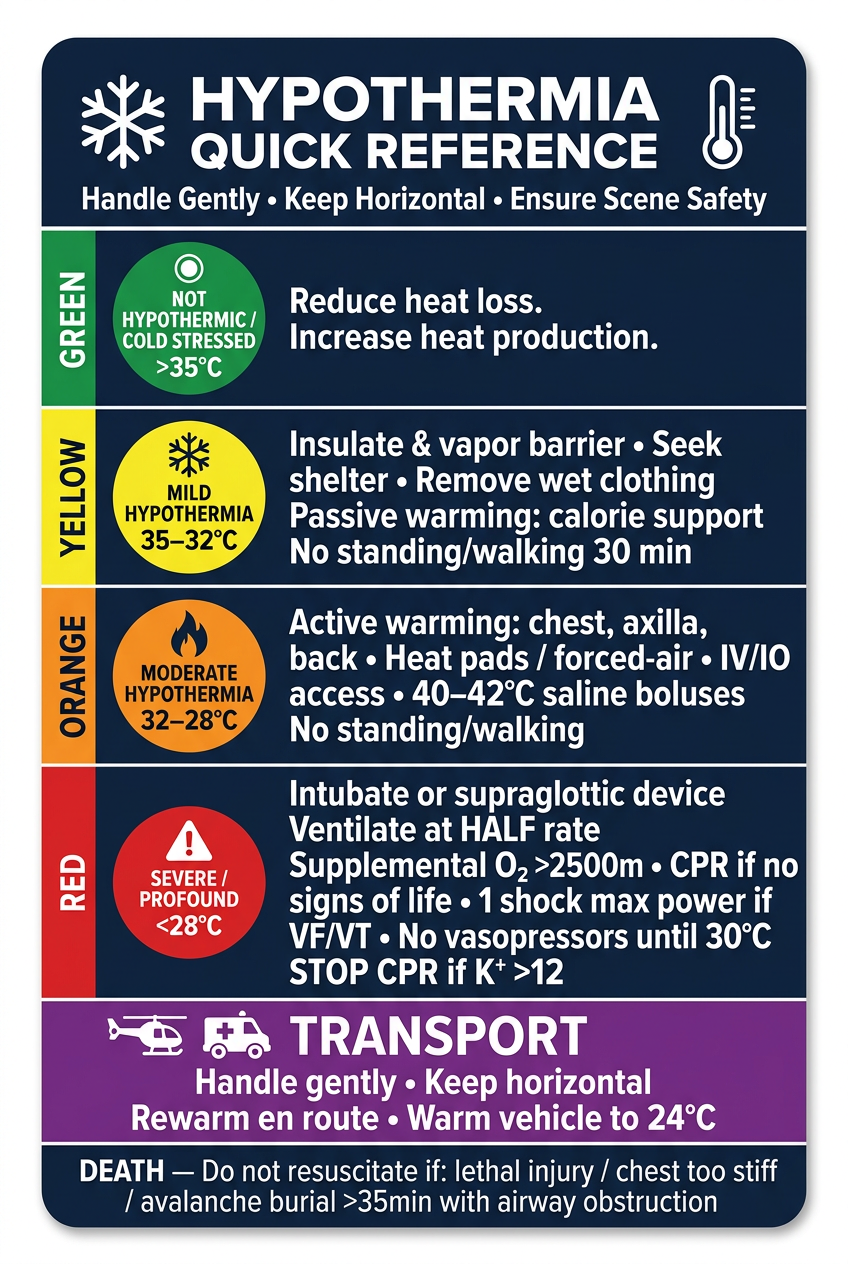
- Color-coded severity bands - green → yellow → orange → red for instant visual triage
- Temperature ranges prominently displayed on each band
- Key actions only - stripped down to what matters most in the field
- CPR rules and the K⁺ >12 stop-CPR rule clearly highlighted
- Transport reminders in the purple footer section
- Death/no-resuscitate criteria at the bottom
- Designed for fast scanning under pressure - high contrast, bold fonts, minimal clutter
Create an infographic image showing the decision tree flow
A tall vertical medical infographic decision tree flowchart for Hypothermia Management. Dark navy blue background, clean modern medical design with glowing node boxes, bold sans-serif typography, and colored connecting arrows. TOP HEADER: Bold white text "HYPOTHERMIA DECISION TREE" with subtitle "Ensure Scene Safety • Handle Gently • Keep Horizontal" and a shield + snowflake icon row. FLOW starts at top center and branches downward: NODE 1 (blue rounded rectangle, center top): 🤔 "SUSPECT HYPOTHERMIA — Normal mental status?" Two arrows branch: LEFT arrow labeled "NO ✗" (red) → NODE 2A | RIGHT arrow labeled "YES ✓" (green) → NODE 2B NODE 2A (left branch, pink box): 🥶 "Shivering?" Arrow DOWN labeled "NO" → "NOT HYPOTHERMIC" (grey pill badge) Arrow RIGHT labeled "YES" → NODE 3 NODE 2B (right branch, blue box): "Shivering?" Arrow labeled "NO →" → "NOT HYPOTHERMIC" (grey) Arrow labeled "YES ↓" → NODE 3 NODE 3 (center, pink-purple box): 🧠 "Functioning normally / Able to care for self?" Arrow RIGHT "YES →" → GREEN treatment box: "MILD 35–32°C" Arrow DOWN "NO ↓" → NODE 4 NODE 4 (center, orange box): 🥶 "Shivering?" Arrow RIGHT "YES →" → YELLOW treatment box: "MILD 35–32°C" Arrow DOWN "NO ↓" → NODE 5 NODE 5 (center, orange-red box): 👁 "Conscious?" Arrow RIGHT "YES →" → ORANGE treatment box: "MODERATE 32–28°C" Arrow DOWN "NO ↓" → NODE 6 NODE 6 (center, red box): ❤️ "Signs of life OR organized rhythm on ECG? (check up to 1 min)" Arrow RIGHT "YES →" → RED treatment box: "SEVERE / PROFOUND <28°C" Arrow DOWN "NO ↓" → NODE 7 NODE 7 (center, dark grey/charcoal box): ⚠️ "Lethal injury? OR Chest too stiff for CPR? OR Avalanche burial >35 min with airway obstructed?" Arrow RIGHT "NO →" → RED treatment box: "SEVERE / PROFOUND <28°C — Begin CPR" Arrow DOWN "YES ↓" → DARK box: "💀 DEATH — Do Not Resuscitate" RIGHT SIDE TREATMENT BOXES (stacked, connected by dotted lines): • Grey pill: "NOT HYPOTHERMIC — Reduce heat loss" • Green box: "COLD STRESSED >35°C — Reduce heat loss, increase heat production" • Yellow box: "MILD 35–32°C — Insulate • Shelter • Passive warming • No walking 30 min" • Orange box: "MODERATE 32–28°C — Active warming chest/axilla/back • IV access • 40–42°C saline" • Red box: "SEVERE <28°C — Intubate • Half ventilation rate • CPR • 1 shock for VF • No vasopressors <30°C • Stop CPR if K⁺>12" BOTTOM PURPLE BANNER: "🚁🚑 DURING TRANSPORT: Handle gently • Keep horizontal • Continue rewarming • Warm vehicle to 24°C" Style: glowing neon-outline boxes on dark background, colored directional arrows with YES/NO labels, severity color gradient green→yellow→orange→red→dark, medical icons, highly readable bold white text, professional infographic aesthetic.
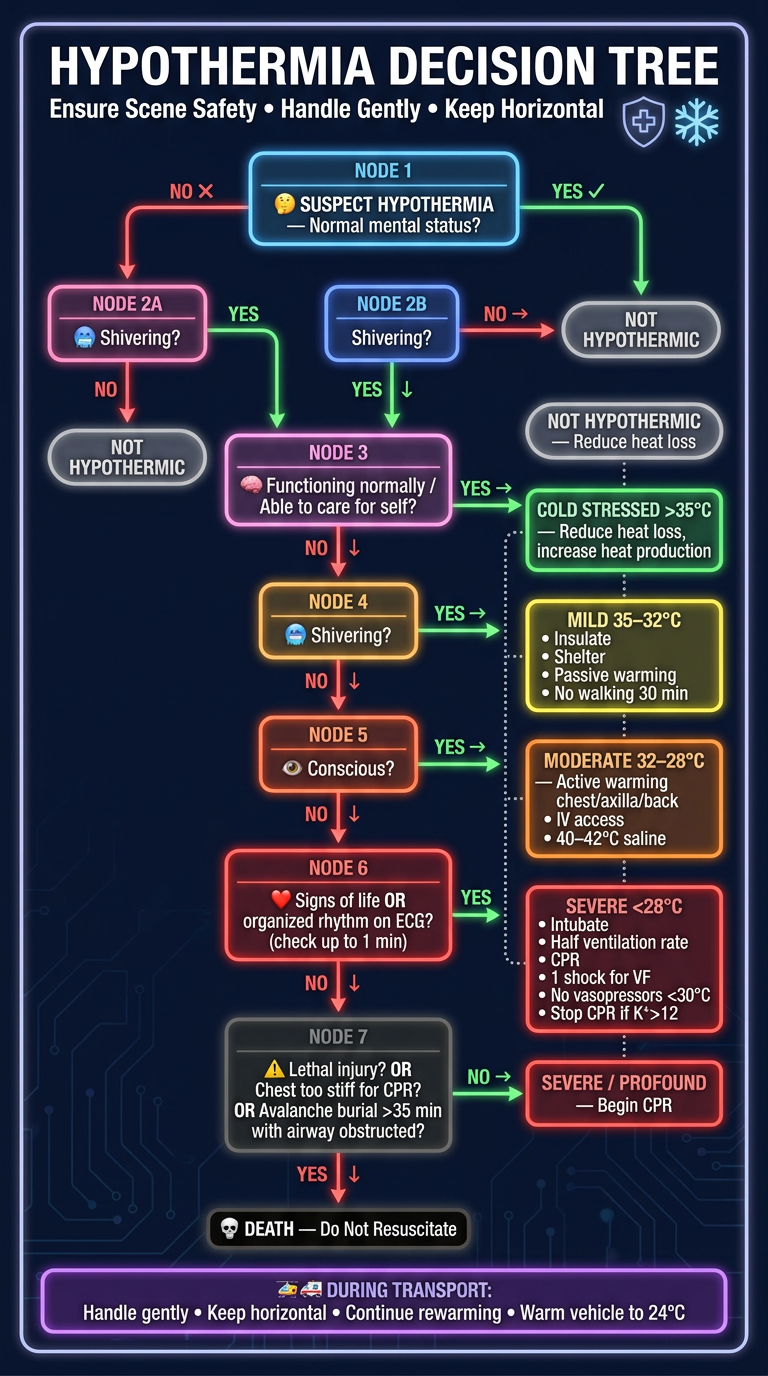
- Top-to-bottom decision flow with clearly labeled YES/NO branching arrows
- 7 sequential decision nodes - each color-coded by severity stage (blue → pink → orange → red → dark)
- Color-gradient treatment boxes on the right side, progressing green → yellow → orange → red
- Each node has an icon - 🤔 🥶 🧠 👁 ❤️ ⚠️ for fast visual recognition
- Death endpoint clearly marked at the bottom with the no-resuscitation criteria
- Transport banner at the bottom with helicopter/ambulance icons
- Dark background with glowing outlined boxes for high visual impact
why the algorithm from wms tells about keeping ambulance teparature at 24 degree ?
WMS Wilderness Medical Society hypothermia algorithm ambulance 24 degrees transport temperature rationale
"hypothermia" AND "prehospital" AND "rewarming" AND "transport"
Why 24°C in the Ambulance/Transport Vehicle?
1. The "Thermal Neutral" Benchmark is Actually 28°C
2. So Why 24°C and Not 28°C?
- Still warm enough to significantly limit further heat loss from the patient
- Tolerable for ambulance and helicopter crew
- Reduces the risk of the crew making errors due to heat stress during a high-stakes resuscitation
"A slightly cooler temperature of 24°C will limit heat loss and is better tolerated by ambulance personnel." Recommendation: Patient compartments in ground and air ambulances should be heated to at least 24°C, if possible, to decrease further heat loss. (Evidence grade: 1C)
The Core Principle Behind It
Note on the Algorithm You Uploaded

can you make a image?
A clean, professional medical infographic image illustrating "The return of normal skin color, warmth, and sensation in the affected part" — depicting successful recovery from frostbite or cold injury. The image shows three side-by-side panels on a white background with a soft warm gradient: LEFT PANEL — "Normal Skin Color": A close-up illustration of a hand with healthy pink-peach skin tone returning, compared to pale/bluish cold-injured skin. A color gradient arrow showing pale/white/blue transforming to healthy pink/normal. Label: "🎨 SKIN COLOR RESTORED" with subtitle "Pale, white, or cyanotic → Returns to normal pink tone" CENTER PANEL — "Warmth": An illustration of a hand with warm red-orange heat waves radiating from it, thermometer icon showing temperature rising to normal. Label: "🌡️ WARMTH RETURNS" with subtitle "Cold, numb tissue → Warm to touch again" RIGHT PANEL — "Sensation": An illustration of fingertips with small nerve/lightning bolt icons showing sensation returning, with a sensation scale graphic. Label: "⚡ SENSATION RESTORED" with subtitle "Numbness resolves → Normal feeling returns" Bottom footer bar in deep blue: "Signs of Successful Rewarming in Cold Injury / Frostbite Recovery" The main title at top in bold dark navy text: "THE RETURN OF NORMAL SKIN COLOR, WARMTH, AND SENSATION IN THE AFFECTED PART" Clean medical illustration style, light background, professional typography, warm color palette (peach, warm orange, sky blue), suitable for clinical education.
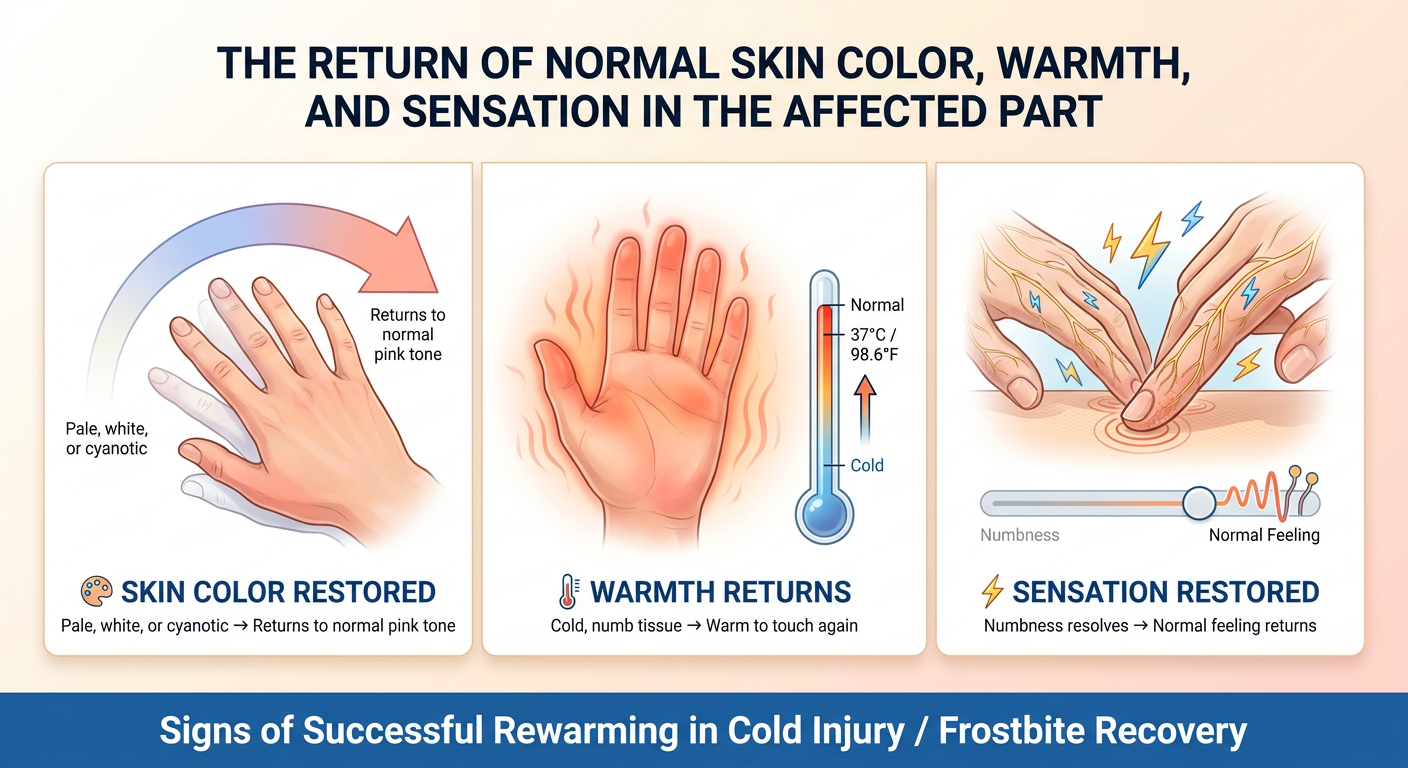
- 🎨 Skin Color - pale/cyanotic skin returning to normal healthy pink tone
- 🌡️ Warmth - cold tissue becoming warm to touch again
- ⚡ Sensation - numbness resolving as nerve function returns