
Create image on How You use Pubmed skill from your actuall skill.md
A clean, professional infographic titled "How Orris Uses the PubMed Skill" with a dark navy blue background and white/light text. The infographic has several clearly labeled sections with icons: SECTION 1 - "When It Triggers" (top, yellow banner): Keywords shown as pills/tags: 'evidence for', 'studies on', 'clinical trials', 'systematic review', 'latest research', 'PubMed' SECTION 2 - "6-Step Workflow" (left column, vertical numbered flow with arrows between each step): Step 1: Construct Query — Use MeSH terms + PICO framework, keep queries SHORT (2-3 terms) Step 2: Search — pubmed_search with pub_types & date_range_years filters Step 3: Triage — Review titles and evidence tiers from results Step 4: Deep Dive — pubmed_detail (action=abstract) for top papers Step 5: Full Text — pubmed_fulltext downloads PDF to workspace, then read the file Step 6: Supplement — web_search for guidelines and FDA alerts not in PubMed SECTION 3 - "Evidence Tier Pyramid" (center, a pyramid diagram): Tier 1 (top, gold): Systematic Review / Cochrane — Highest Tier 2 (orange): Meta-Analysis Tier 3 (light orange): Randomized Controlled Trial (RCT) Tier 4: Clinical Trial Tier 5: Observational / Cohort Study Tier 6: Practice Guideline Tier 7: Review Tier 8: Case Report Tier 9 (bottom, gray): Editorial / Letter / Other — Lowest SECTION 4 - "Tool Toolkit" (right column, icon grid with 5 tools): pubmed_search → Find papers on a topic pubmed_detail → Abstract, citations, related papers pubmed_fulltext → Download full PDF to workspace web_search → Guidelines, FDA alerts, news web_extract → Read full content from URLs SECTION 5 - "Output Format" (bottom, code-style box with monospace font): [Meta-Analysis · Tier 2 · 2024] Paper Title [PMID: 36041474] [RCT · Tier 3 · 2023] Another Paper [PMID: 35123456] SECTION 6 - "If Results Are Insufficient" (bottom right, small box): Broaden: Remove pub_type filter, add synonyms Narrow: Add specific MeSH qualifier Pivot: Try alternate drug/condition names Related: Use pubmed_detail(action=related) on a known PMID Overall layout is organized, modern, and visually clean with color-coded sections, icons, and connecting arrows.
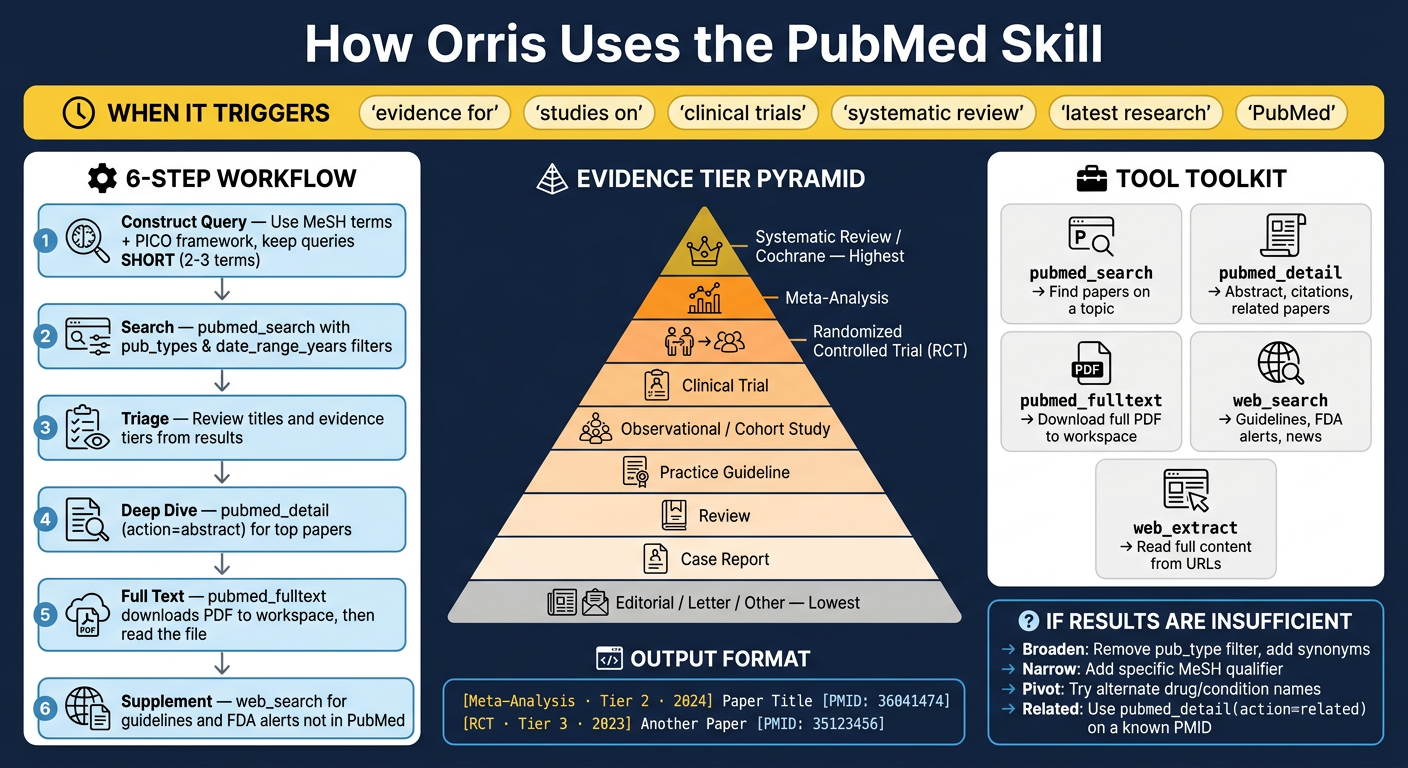
SKILL.md file. It covers every key section:| Section | What's Shown |
|---|---|
| Trigger Keywords | The exact phrases that activate the skill (evidence for, clinical trials, etc.) |
| 6-Step Workflow | Construct Query → Search → Triage → Deep Dive → Full Text → Supplement |
| Evidence Tier Pyramid | All 9 tiers from Systematic Review (highest) down to Editorial (lowest) |
| Tool Toolkit | All 5 allowed tools: pubmed_search, pubmed_detail, pubmed_fulltext, web_search, web_extract |
| Output Format | The exact citation format with Tier labels and PMIDs inline |
| Iteration Strategy | Broaden / Narrow / Pivot / Related — used when fewer than 3 relevant papers are found |