
Create Image on how you use library db and how does agent adapts and iterate on information it finds
A detailed technical diagram showing an AI agent's workflow for using a medical library database, with adaptive iteration cycles. The diagram shows: 1) A central AI Agent node with a brain/circuit icon, 2) An arrow pointing to a "Library Database" (represented as stacked books with a search bar), 3) The agent sending a query with keywords like "FTS5 Search", "Headings", "Paragraphs", 4) Results flowing back showing textbook blocks, section headings, and snippets, 5) A decision diamond labeled "Sufficient Info?" with two paths: YES leads to "Synthesize Answer" and NO loops back to "Refine Query" with adapted search terms, 6) Multiple iteration arrows showing the agent trying broader/narrower searches, 7) Side annotations showing adaptation strategies: "Broaden terms", "Try synonyms", "Search different sections", "Cross-reference books", 8) A final output box showing a well-cited medical answer. Use a clean, modern infographic style with blue and teal color scheme, clear labels, and professional flow chart arrows.
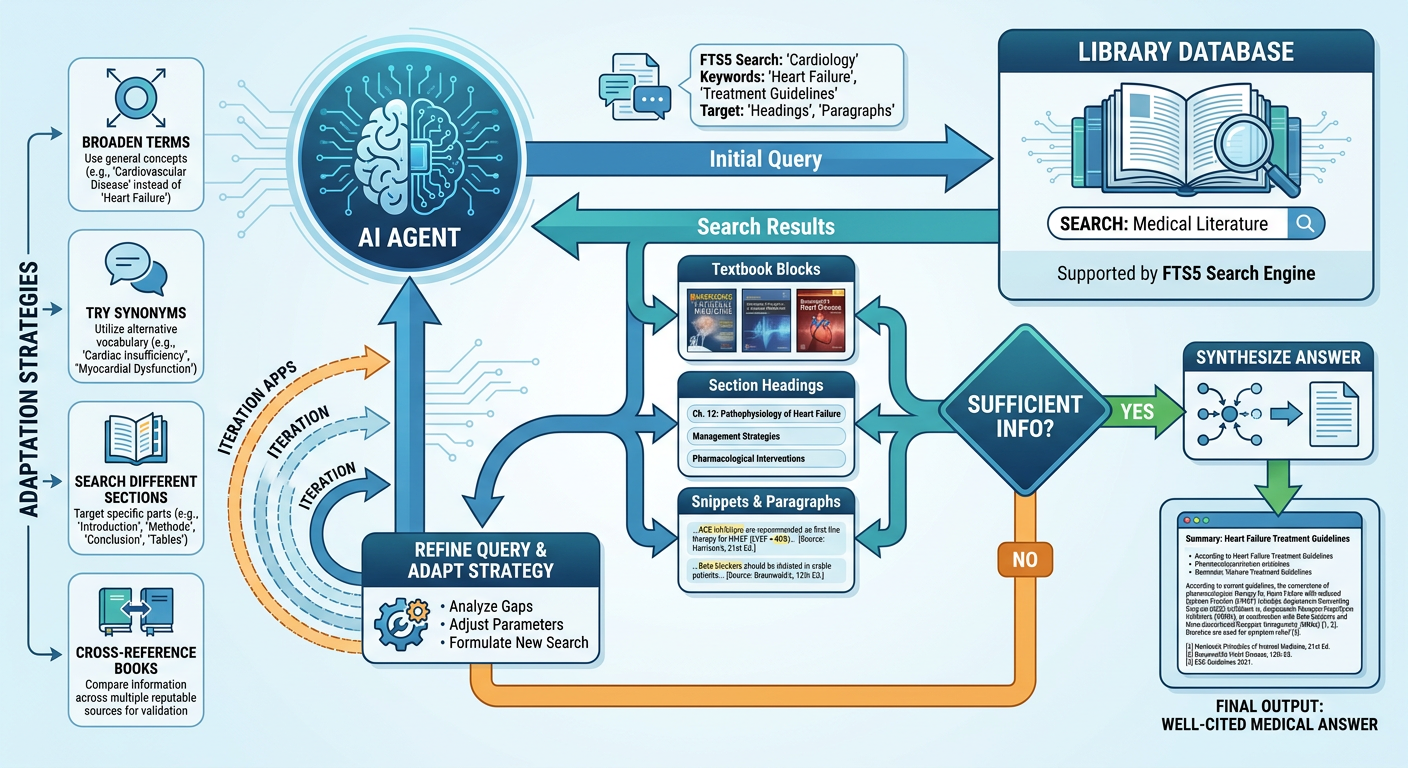
- If results are insufficient (too vague, off-topic, or sparse), the agent refines its query — broadening terms, trying synonyms, switching from heading search to paragraph search, or targeting a different speciality.
- If results are sufficient, it synthesizes them into a coherent answer with citations.
- Switch between
headings_fts(topic-level) andparagraphs_fts(deep content) searches - Use Boolean operators (
AND,OR) and phrase search ("exact phrase") - Cross-reference multiple textbooks across specialities
- Follow file paths to read full blocks when snippets aren't enough