
Minimally invasive surgery in detail 😳
Reading File
Reading File
Reading File
Reading File
Finding Sources
Finding Sources
Finding Sources
Searching PubMed
"minimally invasive surgery" AND outcomes
Searching the Web
Minimally invasive surgery overview laparoscopy robotics benefits risks authoritative patient information
Reading File
Reading File
Reading Web Page
https://pmc.ncbi.nlm.nih.gov/articles/PMC13329545/
Reading File
Finding Sources
Finding Sources
Minimally invasive surgery (MIS)
Minimally invasive surgery means performing an operation through small incisions or natural openings, using a camera and long specialized instruments rather than one large open incision. The principle is: small access wounds, but the same therapeutic goal. It is also called minimal-access surgery.
Schwartz’s Principles of Surgery, p. 453 defines MIS as major operations performed through small incisions with imaging systems to reduce the trauma of surgical exposure.

1. Main forms of MIS
| Method | Access route | Typical examples |
|---|---|---|
| Laparoscopic surgery | Small abdominal wall incisions | Gallbladder removal, appendicectomy, hernia repair, colorectal surgery, bariatric surgery |
| Thoracoscopic surgery / VATS | Small chest-wall incisions | Lung biopsy, pleural procedures, lung resection |
| Arthroscopy | Small joint portals | Meniscal repair, ACL reconstruction, shoulder surgery |
| Endoscopic surgery | Natural opening, such as mouth or anus | Colon polyp removal, ERCP, endoscopic sinus surgery |
| Robotic-assisted surgery | Usually laparoscopic ports | Prostatectomy, hysterectomy, pelvic and colorectal procedures |
| Endovascular intervention | Needle puncture into a blood vessel | Angioplasty, stenting, aneurysm repair |
| Single-incision laparoscopy | Several instruments through one umbilical incision | Selected gallbladder or gynecologic operations |
| NOTES | Flexible endoscope through a natural orifice, then through an internal wall | Mainly selected or developing applications |
2. How laparoscopy works
Laparoscopy is the classic MIS approach for the abdomen.
- The patient is given anesthesia, usually general anesthesia.
- A small incision is made, commonly near the umbilicus.
- The abdomen is inflated with carbon dioxide (CO₂) to create a working space called a pneumoperitoneum.
- A camera-bearing laparoscope is inserted through a port.
- Additional ports allow insertion of graspers, scissors, energy devices, staplers, suction, and suturing instruments.
- The surgeon operates while watching a magnified video image.
- The specimen may be removed through a port that is enlarged slightly, or through a small extraction incision.
- CO₂ is released and the port wounds are closed.
Good port placement permits triangulation: the camera and instruments approach the target from useful angles, allowing safer dissection and suturing.
3. Why CO₂ is used
CO₂ is preferred for pneumoperitoneum because it is nonflammable and highly soluble in blood, so it can be exhaled through the lungs. However, insufflation and patient positioning can affect respiratory and cardiovascular physiology.
Important effects include:
- Increased intra-abdominal pressure
- Reduced venous return in some settings
- Raised diaphragm with reduced lung compliance
- Increased CO₂ absorption, potentially causing hypercapnia
- Higher airway pressures during ventilation
- Position-related effects, especially Trendelenburg position
These effects matter particularly in patients with severe cardiopulmonary disease, obesity, raised intracranial pressure, or limited respiratory reserve. Barash, Cullen, and Stoelting’s Clinical Anesthesia, key points on laparoscopy, notes that pneumoperitoneum and positioning cause important physiologic changes.
4. Instruments used
- Laparoscope: telescope with light source and camera
- Trocars/ports: sleeve-like access devices placed through the abdominal wall
- Graspers and dissectors: hold and separate tissue
- Scissors: divide tissue
- Energy devices: control bleeding and divide vessels or tissue, such as monopolar/bipolar cautery, ultrasonic and advanced bipolar devices
- Suction-irrigation device: clears blood, bile, pus, or smoke
- Clip appliers and staplers: seal ducts, vessels, or bowel
- Needle holders: intracorporeal suturing
- Retrieval bag: removes specimens while limiting contamination or tumor spillage
5. Advantages compared with open surgery
Advantages depend on the operation, pathology, surgeon expertise, and patient condition. MIS is not automatically better for every case.
Common benefits are:
- Smaller incisions and less tissue trauma
- Less postoperative pain and lower analgesic requirement
- Lower wound complication and surgical-site infection rates in many operations
- Less blood loss in selected procedures
- Earlier mobilization
- Faster return of bowel function after many abdominal procedures
- Shorter hospital stay
- Earlier return to work and ordinary activity
- Better cosmetic result
- Reduced surgical stress response
Anesthesia literature reports that MIS is associated with less surgical stress than comparable open procedures; laparoscopic operations have lower surgical-site infection rates, less postoperative pain, and better postoperative respiratory function in appropriate patients. Morgan and Mikhail’s Clinical Anesthesiology, p. 2105.
6. Limitations and disadvantages
MIS has trade-offs:
- Reduced tactile feedback compared with open surgery
- Two-dimensional vision in standard laparoscopy, though 3D systems are available
- Long instruments amplify tremor and can create an awkward fulcrum effect at the abdominal wall
- Complex suturing and knot tying require training
- Equipment failure or limited availability
- Some procedures take longer, particularly early in a surgeon’s learning curve
- May require conversion to open surgery
- Robotic systems can add substantial capital, maintenance, and disposable-instrument costs
A recent systematic review found that robotic and conventional laparoscopic approaches generally have comparable complication outcomes, while robotic surgery may offer selected benefits in technically difficult operations. It also often has longer operating times and higher resource use. See the 2026 systematic review and recent PubMed evidence including PMID 41560010. Results should not be generalized from one operation to every specialty.
7. Complications
A. Access-related complications
These occur during entry, trocar placement, or creation of pneumoperitoneum:
- Injury to bowel, bladder, uterus, or solid organs
- Major vascular injury, though uncommon but potentially life-threatening
- Abdominal wall bleeding, including inferior epigastric vessel injury
- Port-site hematoma
- Port-site hernia
- Subcutaneous emphysema
- Failed access or extraperitoneal insufflation
B. CO₂ pneumoperitoneum-related complications
- Hypercapnia and respiratory acidosis
- Reduced venous return and hemodynamic instability
- Cardiac arrhythmia
- Pneumothorax or pneumomediastinum
- Rare CO₂ gas embolism
- Shoulder-tip pain after surgery, often from diaphragmatic irritation by residual gas
C. Procedure-specific complications
These are usually more important than the access method itself:
- Bleeding
- Infection
- Leak after bowel, biliary, urinary, or vascular repair
- Injury to adjacent structures
- Deep venous thrombosis or pulmonary embolism
- Anastomotic leak
- Persistent disease, recurrence, or need for reintervention
D. Conversion to open surgery
Conversion is not a failure. It is a safety decision when visualization is poor or anatomy is unsafe, for example:
- Uncontrolled bleeding
- Dense adhesions
- Severe inflammation
- Difficult tumor invasion
- Unclear anatomy
- Organ injury
- Equipment problems
- Inability to safely complete the intended repair
A patient should be consented for possible conversion before surgery.
8. Robotic-assisted surgery
Robotic surgery is still surgeon-controlled MIS. The robot does not independently operate on the patient.
The surgeon sits at a console and controls instrument arms at the bedside. Potential technical advantages include:
- High-definition magnified, often three-dimensional vision
- Wristed instruments with more degrees of freedom than straight laparoscopic instruments
- Motion scaling
- Tremor filtration
- Improved surgeon ergonomics
- Potential benefit for fine dissection and suturing in confined spaces, such as the pelvis
Schwartz’s Principles of Surgery, p. 453 describes robotic surgery more accurately as computer-enhanced surgery, because the system translates the surgeon’s movements rather than acting autonomously.
Disadvantages: high cost, docking and set-up time, limited availability, specialized team training, and often longer operating times. For standard, less complex procedures, robotic surgery does not consistently produce better patient outcomes than conventional laparoscopy.
9. Common operations done minimally invasively
- Laparoscopic cholecystectomy
- Laparoscopic appendicectomy
- Laparoscopic inguinal and ventral hernia repair
- Anti-reflux surgery, such as fundoplication
- Bariatric surgery
- Colectomy and rectal cancer surgery
- Hysterectomy and gynecologic cancer surgery
- Prostatectomy and partial nephrectomy
- Adrenalectomy
- Thoracoscopic lung and pleural procedures
- Arthroscopic knee and shoulder procedures
- Endoscopic sinus, skull-base, gastrointestinal, and urologic surgery
- Catheter-based cardiovascular interventions
10. Patient selection
The decision is individualized. Factors include:
- Nature and severity of the disease
- Need for emergency surgery
- Previous operations and expected adhesions
- Size and location of a tumor
- Bleeding risk
- Obesity
- Heart and lung function
- Pregnancy
- Presence of severe infection, perforation, or instability
- Availability of equipment and an appropriately trained surgical team
Open surgery can be safer or more appropriate for unstable patients, massive bleeding, severe contamination, very complex anatomy, or when rapid access is necessary.
11. Enhanced recovery connection
MIS is commonly part of an enhanced recovery after surgery (ERAS) pathway, together with:
- Preoperative optimization and counseling
- Multimodal, opioid-sparing analgesia
- Prevention of nausea and vomiting
- Early oral intake when appropriate
- Early walking and physiotherapy
- Avoiding unnecessary tubes and drains
- Venous thromboembolism prevention
The aim is not merely to make the incision smaller. It is to reduce the total physiologic burden of surgery while preserving safety and quality of the operation.
Key takeaway
MIS reduces the trauma of surgical access, not the seriousness of the operation itself.
A small scar can still involve a major operation, anesthesia, bleeding risk, organ injury risk, and recovery requirements. The best approach is the one that lets the surgeon complete the required operation safely and effectively for that individual patient.
Ergonomics od mas in detail
Reading File
Finding Sources
Finding Sources
Finding Sources
Searching PubMed
laparoscopic surgery ergonomics
Searching the Web
laparoscopic surgery ergonomics monitor height port placement surgeon posture guideline
Reading File
Reading File
Reading File
Reading Web Page
https://pmc.ncbi.nlm.nih.gov/articles/PMC2924545
Ergonomics of Minimal Access Surgery (MAS)
Ergonomics is the science of fitting the work environment, equipment, and task to the operator. In minimal access surgery, the goal is to achieve a comfortable, neutral posture for the surgeon and team while maintaining safe visualization and instrument control.
This matters because laparoscopy can create awkward posture, static muscle loading, eye strain, hand fatigue, and cognitive stress, even though it benefits the patient. Sabiston Textbook of Surgery, p. 268.
Why MAS is ergonomically difficult
In open surgery, the surgeon's hands work directly at the operative field. In MAS, the surgeon operates through fixed ports using long instruments while viewing a monitor. This creates several constraints:
-
Fulcrum effect
The abdominal wall acts as a pivot. Moving the external handle left makes the instrument tip move right internally. This counterintuitive movement initially increases workload and fatigue. -
Long instruments
Long "straight-stick" instruments place the surgeon farther from the patient and may force reaching, shoulder abduction, and trunk extension. -
Reduced degrees of freedom
Open surgical hands have many movement possibilities, whereas straight laparoscopic instruments substantially restrict movement. This promotes fixed, non-neutral postures. -
Loss of tactile feedback
The surgeon relies more heavily on vision, increasing visual and mental demand. -
Static posture
Prolonged standing with the arms held elevated causes sustained contraction of neck, shoulder, back, forearm, and hand muscles. -
Indirect visualization
A poorly located monitor makes the surgeon rotate, flex, or extend the neck and trunk. This increases eye, neck, and shoulder strain. -
Poorly designed handles and pedals
Ring handles can cause wrist flexion and ulnar deviation. A badly positioned diathermy foot pedal can disturb balance and cause calf or lower-limb fatigue.
Consequences of poor ergonomics
Poor MAS ergonomics may cause:
- Neck pain and cervical muscle strain
- Shoulder pain, especially trapezius and deltoid fatigue
- Low-back pain from leaning or hyperextension
- Forearm fatigue
- Wrist pain, flexion, extension, or ulnar deviation strain
- Hand and finger numbness or paresthesia
- Reduced precision and tremor control
- Slower task performance
- Reduced concentration during long procedures
- Work-related musculoskeletal disorders and reduced career longevity
The problem is relevant not only to the primary surgeon but also to assistants, camera holders, scrub nurses, and anesthetic or imaging personnel.
Principles of ideal MAS ergonomics
1. Surgeon posture
Ideal posture
The surgeon should have:
- Head and neck in a neutral or slightly flexed position
- Relaxed shoulders, not elevated
- Upright trunk, avoiding leaning, twisting, and overextension
- Elbows near the side of the body
- Elbow flexion roughly 90° to 120°
- Forearms approximately parallel to the floor where feasible
- Wrists in a neutral position, without marked flexion, extension, radial deviation, or ulnar deviation
- Balanced stance, with feet shoulder-width apart
- Body weight distributed evenly across both feet
- Instruments handled close to the body rather than at full reach
Avoid
- Chin-up position to view a high monitor
- Constant neck rotation toward a side monitor
- Excessive shoulder abduction
- Bending forward to reach the patient
- Leaning backward to accommodate a high table
- Twisting the trunk while the feet remain fixed
- Prolonged single-leg stance when using a foot pedal
2. Operating-table height
Table height is one of the simplest and most important adjustments.
Practical rule
The table should allow the surgeon to work with the instrument handles at or slightly below elbow height. This avoids excessive elevation of the shoulders and allows relaxed forearm movement.
A commonly cited range is approximately 64 to 77 cm from the floor, but the right height depends on surgeon height, patient body habitus, port position, and procedure. Individual adjustment is better than applying one universal number.
Effects of wrong table height
| Table position | Ergonomic consequence |
|---|---|
| Too high | Shoulder elevation, arm abduction, wrist strain, neck tension |
| Too low | Forward trunk flexion, back strain, elbow extension, poor fine control |
| Correct height | Relaxed shoulders, elbows close to trunk, reduced static muscular load |
For a short surgeon or tall patient, use a stable foot platform rather than maintaining an awkward raised posture.
3. Monitor position
The monitor should be positioned so the surgeon can look at it without turning or extending the neck.
Recommended setup
- Place the primary monitor directly in front of the surgeon, across the operating table.
- Ideally, the patient and operative field lie between surgeon and monitor.
- Place the top of the screen at about eye level or slightly lower.
- The monitor image is commonly recommended at up to 25° below the horizontal visual axis to reduce neck strain.
- Keep the monitor about an arm's length away. If it is too close or too far, visual fatigue increases.
- Use high-resolution, appropriately bright displays and reduce glare.
- Use two or more monitors for operations requiring changes in surgeon position or for assistants who otherwise have to twist their necks.
For example, during pelvic laparoscopy, the monitor is commonly placed near the patient's feet. During laparoscopic cholecystectomy, positioning the monitor in line with the surgeon's working direction prevents excessive neck rotation. Schwartz’s Principles of Surgery, p. 458.
4. Port placement and triangulation
Correct trocar placement is not merely a technical issue. It directly determines surgeon posture, shoulder load, wrist angle, instrument collision, and precision.
Principles
-
Optical port
- Usually positioned centrally for the best view of the target.
- The camera should provide a direct, stable view rather than forcing awkward instrument angles.
-
Working ports
- Positioned on either side of the camera port to create a triangular configuration.
- Permit two-handed work and reduce external clashing.
- Should allow instrument manipulation without excessive elbow elevation or extreme wrist angles.
-
Target distance
- A commonly taught arrangement places the target around 15 to 20 cm from the camera port.
- Working ports are placed along the same arc, approximately 5 to 7 cm on either side of the optical port, adjusted for procedure and patient anatomy.
-
Instrument-target angle
- An angle of approximately 60° to 90° between instruments at the target often permits efficient dissection and suturing.
- Very narrow angles create crowding and "sword fighting."
- Very wide angles increase shoulder abduction, hand fatigue, and loss of precision.
-
Retracting ports
- Place more laterally when appropriate so retraction does not clash with the camera and working instruments.
Sabiston Textbook of Surgery, p. 268 emphasizes a central optical port, lateral retracting ports, and working ports between them for ergonomic mobility.
Poor port placement causes
- Instrument collision outside and inside the body
- Excessive manipulation of the abdominal wall
- Poor view of target anatomy
- Reduced range of motion
- Need for awkward hand crossing
- Excessive arm abduction and shoulder fatigue
- Longer operation time and increased technical errors
5. Instrument design and handling
Handle ergonomics
Traditional laparoscopic ring handles can force:
- Finger flexion
- Wrist deviation
- High gripping force
- Compression of digital nerves
- Forearm muscle fatigue
Choose handles that fit the surgeon's hand size and allow a neutral wrist. Useful features include:
- Pistol-grip or axial handles, depending on the task
- Reduced required grip force
- Spring mechanisms that do not require sustained compression
- Rotatable shafts
- Instrument length appropriate to patient habitus and depth of operation
Handling principles
- Hold instruments with a gentle but secure grip.
- Avoid prolonged maximum grip force.
- Keep the wrist neutral.
- Use both hands efficiently and alternate tasks if possible.
- Rest the arms intermittently during noncritical phases.
- Use an appropriate instrument length. Instruments that are too long increase torque and fatigue; those too short may force uncomfortable reaching.
6. Foot pedal ergonomics
Foot pedals control electrosurgery, ultrasonic energy, irrigation, or other devices.
Good pedal position
- Near the operating foot
- Clearly distinguishable from other pedals
- Positioned so it can be reached without stepping, leaning, or twisting
- Allowing the surgeon to retain a balanced stance
- Cables organized to avoid tripping
Problems with bad pedal placement
- Lower-limb cramps and fatigue
- Shift of center of gravity
- Loss of balance
- Increased back and core strain
- Unintended activation of energy devices
If a surgeon must continuously search for or reposition a pedal during surgery, the room setup needs correction.
7. Camera-holder and assistant ergonomics
The assistant and camera holder are often more vulnerable to static strain because they may maintain an uncomfortable position for prolonged periods.
They need:
- Their own monitor, in front of them
- A clear line of sight
- Adequate space around the table
- A neutral neck and trunk position
- Camera position that avoids sustained shoulder elevation
- Clearly assigned roles and verbal communication with the operating surgeon
A second monitor reduces the need for assistants to twist their necks toward the surgeon's monitor.
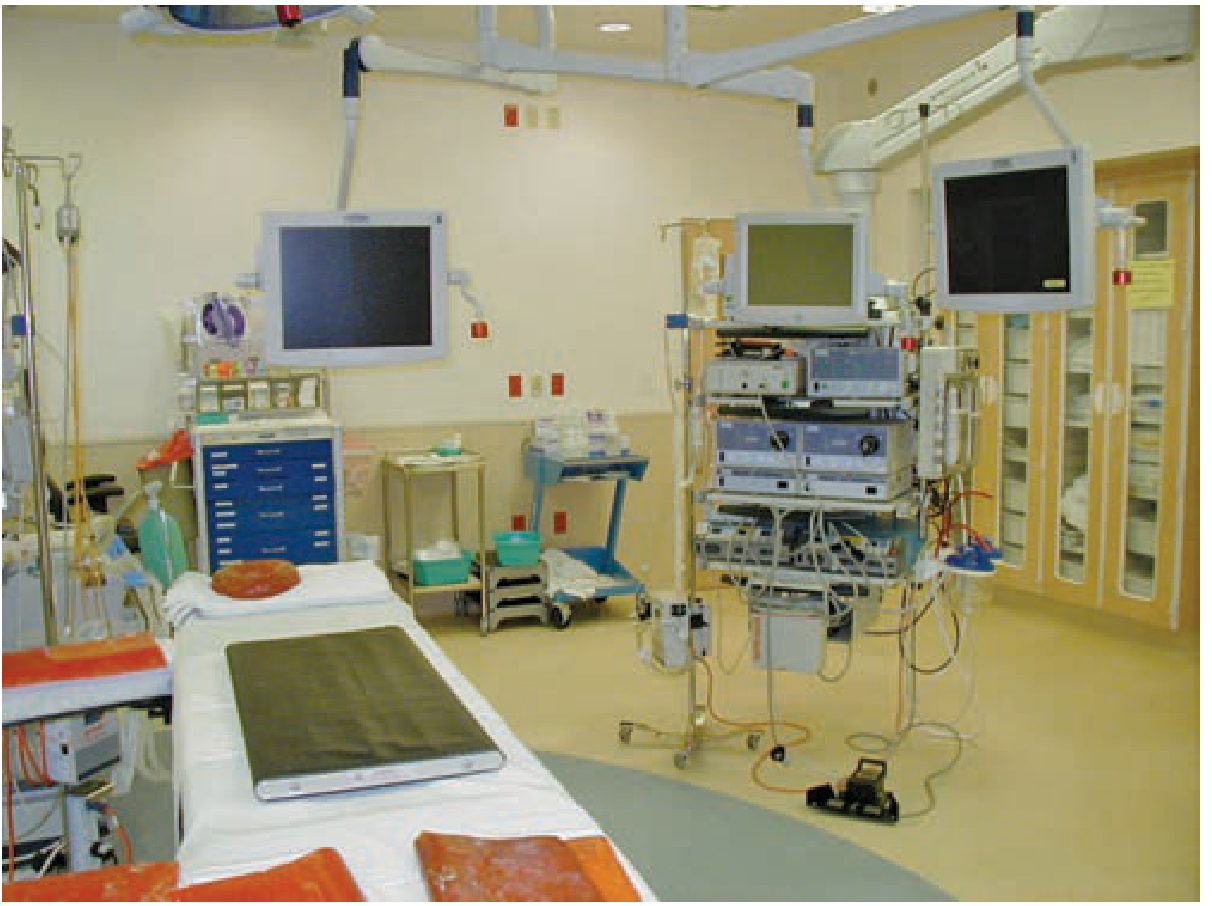
8. Operating-room design
A well-designed MIS suite improves efficiency and decreases physical strain.
Desirable features
- Ceiling-mounted or mobile monitors
- Mobile equipment towers
- Organized cables and tubing
- Adequate space for staff movement
- Easy access to insufflator, electrosurgical unit, suction, and imaging
- Multiple displays where needed
- Clear positioning of anesthetic equipment and patient monitors
- Adjustable operating table and monitor arms
A dedicated MIS suite reduces cable disorganization, allows rapid adjustment of core equipment, facilitates staff movement, and improves ergonomics. Schwartz’s Principles of Surgery, p. 458.
Robotic surgery and ergonomics
Robotic-assisted surgery can improve ergonomics for the console surgeon because it provides:
- Seated operating position
- Adjustable console height and arm support
- Three-dimensional magnified vision
- Wristed instruments
- Motion scaling
- Tremor filtration
- Less need for extreme wrist positions and shoulder elevation
Bailey and Love’s Short Practice of Surgery, p. 246 notes that console adjustment can reduce operator physical stress and fatigue.
However, robotics does not remove every ergonomic problem:
- The bedside assistant may still have laparoscopic strain.
- A poorly adjusted console can cause neck, shoulder, or eye strain.
- Long console work can still produce static posture fatigue.
- The console surgeon may become less aware of nonverbal communication and events at the patient bedside.
Therefore, console height, chair height, armrest position, viewer position, and team communication must all be optimized.
Ergonomic checklist before starting MAS
Surgeon checklist
- Is the operating table at elbow-level working height?
- Is the monitor directly ahead and slightly below eye level?
- Is the monitor at a comfortable viewing distance?
- Are shoulders relaxed and elbows close to the trunk?
- Can both wrists remain neutral?
- Are the ports positioned for triangulation and instrument mobility?
- Are instrument handles suitable for the surgeon's hand?
- Is the energy foot pedal close, identifiable, and stable?
- Is there a second monitor for the assistant or for anticipated changes in surgeon position?
- Are cables and tubing organized and out of the walking path?
- Is a short stretch or posture reset planned during a long operation?
Exam summary
Ergonomics in MAS aims to reduce surgeon fatigue and musculoskeletal injury while preserving precise, safe surgery. The most important elements are:
- Neutral surgeon posture
- Correct operating-table height
- Monitor directly ahead and slightly below eye level
- Proper port placement with triangulation
- Comfortable instrument handles and neutral wrist alignment
- Correct placement of foot pedals
- Adequate monitors and ergonomic positioning for assistants
- Organized operating room with minimal cable clutter
- Regular posture adjustment during long cases
- Appropriate training in laparoscopic and robotic technique
Recent systematic-review evidence also supports the concern: surgeons experience substantial ergonomic and muscular strain in conventional laparoscopy, while robotic approaches may improve posture and physical comfort in some settings, though the benefit varies by procedure and workstation setup. See the 2025 systematic review and the 2026 instrument-selection guideline review, PMID 42035794.
Angles in ergonomics
Reading File
Finding Sources
Searching PubMed
laparoscopic surgery ergonomics angles
Searching the Web
laparoscopic surgery ergonomic angles manipulation azimuth elevation monitor 25 degrees port triangulation
Angles in ergonomics of minimal access surgery
These angles guide trocar placement, instrument movement, camera alignment, monitor position, and surgeon posture. They improve precision and reduce fatigue, instrument collision, and awkward wrist or shoulder posture.
1. Manipulation angle
Definition: The angle formed between the two working instruments at the target organ or tissue.
 Working instrument \     / Working instrument
                    \   /
                     \ /
                  Target tissue

          Manipulation angle
Ideal range
- 45° to 75° is commonly regarded as ergonomically favorable.
- Around 60° is often considered an excellent practical target for two-handed tasks such as dissection and suturing.
- Some teaching sources allow 60° to 90°, depending on the operation, anatomy, and required maneuver.
Why it matters
At an appropriate manipulation angle, the surgeon has:
- Effective bimanual dissection
- Better depth perception and tissue traction-countertraction
- Less instrument clashing
- Less shoulder abduction and wrist deviation
- Improved precision and task speed
If the angle is too narrow: <45°
      \ /
       V
     Target
Problems:
- Instruments collide externally and internally, called sword fighting
- Reduced freedom of movement
- Handles may cross
- Surgeon adopts awkward wrist and shoulder positions
- Suturing and knot tying become difficult
- Camera may obstruct instrument movement
If the angle is too wide: >75° to 90°
 \               /
  \             /
   \           /
      Target
Problems:
- Excessive reaching and shoulder abduction
- Loss of fine control
- Increased torque at abdominal wall ports
- More muscle fatigue
- Difficulty maintaining a comfortable stance
Exam line:
The ideal manipulation angle in laparoscopy is approximately 45° to 75°, with about 60° giving efficient instrument handling in many tasks.
2. Elevation angle
Definition: The angle between the instrument shaft and the horizontal plane of the abdominal wall or operating table.
It represents how steeply an instrument enters toward the target.
          Instrument
              \
               \  Elevation angle
----------------\---------------- Abdominal wall plane
                 \
                 Target
Important relationship
The elevation angle should approximately match the manipulation angle for best task efficiency.
| Manipulation angle | Favorable elevation angle |
|---|---|
| 30° | About 30° |
| 45° | About 45° |
| 60° | About 60° |
For example, if anatomy forces a narrow 30° manipulation angle, a similar 30° elevation angle is generally more efficient than trying to use a steep angle. The review on laparoscopic ergonomics reports that matching the two angles is associated with shorter execution time and better performance.
Problems with a wrong elevation angle
- Too low or shallow: limited access, instrument collision, poor reach
- Too high or steep: excessive vertical force at the port, reduced working space, awkward arm and wrist posture
- Mismatch with manipulation angle: slower, less precise movement and more fatigue
3. Azimuth angle
Definition: The angle between the camera port and a working port, measured around the target in the horizontal plane.
In simple terms, it tells you how evenly the camera and working instruments are spread around the target.
              Camera port
                   |
                   |  Azimuth angle
                   |
Working port ------ Target ------ Working port
Ergonomic principle
- The two working ports should usually have approximately equal azimuth angles relative to the camera port.
- This creates symmetrical triangulation.
- Equal or near-equal azimuth angles improve visualization, bimanual access, and balance between right and left hands.
Practical meaning
If one instrument approaches very close to the camera axis while the other approaches from far away:
- The near instrument may collide with the laparoscope
- The far instrument may force reaching
- The surgeon may twist the trunk or wrists
- Dissection becomes asymmetrical and less controlled
Exam line:
Equal azimuth angles around the camera port provide symmetrical triangulation and better ergonomic instrument movement.
4. Target distance from ports
Optical port to target
- Commonly 15 to 20 cm from the target organ or operative site.
Working ports
- Often placed on the same 15 to 20 cm arc around the target.
- Common teaching is about 5 to 7 cm to either side of the optical port, adjusted to patient size and the procedure.
This setup helps achieve a useful manipulation angle while avoiding crowding. The laparoscopy ergonomics review describes this triangular configuration and target distance.
Too close to target
- Poor overview
- Instrument crowding
- Excessive movement at handles
- Clashing at the abdominal wall
Too far from target
- Loss of force transmission and precision
- Long, tiring movements
- Excessive shoulder and arm movement
- Difficulty in suturing
5. Camera angle
Laparoscopes commonly have a 0° or 30° viewing angle.
| Camera | View | Best use |
|---|---|---|
| 0° laparoscope | Looks straight ahead | Simple orientation, basic procedures |
| 30° laparoscope | Looks obliquely upward or downward when rotated | Better viewing around structures, pelvis, upper abdomen, deep spaces |
A 30° scope improves the ability to look over or around organs without changing trocar position. However, the camera holder must rotate it correctly, otherwise the horizon becomes tilted and can increase visual disorientation.
Ergonomic rule
The camera should be positioned so that the operative target, working instruments, and monitor image are aligned with the surgeon's natural direction of work.
6. Monitor viewing angle
Definition: The vertical angle between the surgeon's horizontal eye line and the monitor image.
Preferred monitor angle
- Monitor should be at eye level or slightly below it
- The image is ideally up to about 25° below the horizontal eye line
- Avoid placing the monitor above eye level, which creates a “chin-up” posture
Eye line  ------------------------>
                    \
                     \  0° to 25° downward
                      \
                     Monitor
Why?
A slightly downward gaze reduces neck extension and trapezius muscle strain. A high monitor forces cervical extension; a low monitor causes excessive neck flexion. The NIH-hosted ergonomic review supports monitor placement within about 25° below the horizontal visual plane.
7. Elbow and shoulder angles
These refer to the surgeon's body posture rather than port geometry.
Elbow
- Keep elbows close to the trunk
- Aim for roughly 90° to 120° elbow flexion
- Instrument handles should be near elbow level or slightly below
Shoulder
- Keep shoulder abduction low, ideally less than 30°
- Avoid sustained shoulder elevation and reaching away from the body
Wrist
- Maintain a near-neutral wrist
- Avoid prolonged flexion, extension, radial deviation, and ulnar deviation
These positions reduce static loading of the trapezius, deltoid, forearm flexors, and wrist muscles. Conventional laparoscopy creates particular strain because long, fixed instruments and ring handles can force awkward wrist and shoulder postures. Sabiston Textbook of Surgery, p. 268.
8. Ergonomic triangulation: putting the angles together
A good laparoscopic setup has:
                  Camera port
                      |
                      |
              15-20 cm to target
                      |
                   Target
                  /      \
        Working port      Working port
Ideal practical configuration
- Central camera port
- Two working ports on either side
- Manipulation angle: 45° to 75°, preferably near 60°
- Elevation angle: approximately equal to manipulation angle
- Azimuth angles: approximately equal on both sides
- Target-to-camera distance: 15 to 20 cm
- Monitor angle: 0° to 25° below horizontal eye level
- Elbow flexion: about 90° to 120°
- Shoulder abduction: minimized, preferably <30°
9. Special situation: single-incision laparoscopic surgery
Single-incision laparoscopic surgery disrupts normal triangulation because camera and instruments enter through one small site.
Consequences:
- Very narrow manipulation angle
- Instrument clashing
- External handle collision
- Crossed-hand technique
- Greater ergonomic difficulty
- Less intuitive movement
Curved or articulating instruments, flexible scopes, and robotic single-site platforms can partly restore triangulation. Textbooks note that loss of triangulation is a key reason single-site surgery is ergonomically challenging.
High-yield table
| Angle / measurement | Usual ergonomic target | Main purpose |
|---|---|---|
| Manipulation angle | 45° to 75°, often ~60° | Efficient two-handed work |
| Elevation angle | Similar to manipulation angle | Efficient instrument path |
| Azimuth angles | Equal on both sides | Symmetrical triangulation |
| Camera-target distance | 15 to 20 cm | Adequate view and working space |
| Working-port separation | Often 5 to 7 cm from camera port on the target arc | Avoids crowding |
| Monitor below eye line | 0° to 25° downward | Reduces neck strain |
| Elbow flexion | 90° to 120° | Relaxed arm position |
| Shoulder abduction | Preferably <30° | Reduces shoulder fatigue |
One-line memory aid
“60-60-20-25”: approximately 60° manipulation, 60° elevation, 20 cm camera-to-target distance, and monitor up to 25° below eye level.
This is a shared conversation. Sign in to Orris to start your own chat.