
Teach me how to take ecg strip also explain what buttons to press on a ecg machine
how to take ECG strip electrode placement machine buttons steps
https://www.gla.ac.uk/media/Media_955388_smxx.pdf
ECG machine buttons power patient data filter print record auto manual GE Philips MAC
How to Take an ECG Strip - Complete Step-by-Step Guide
What Is an ECG?
Equipment You Need
| Item | Purpose |
|---|---|
| ECG machine | Records and prints the trace |
| ECG adhesive electrode patches (x10) | Attach leads to skin |
| Razor/clippers | Remove chest hair if needed |
| Alcohol swabs / gauze | Skin prep |
| Lead wires (cable set) | Connect electrodes to machine |
| ECG paper (loaded in printer) | Paper trace output |
STEP 1 - Prepare the Machine
- Power on - Press and hold the Power button for 2-3 seconds until the screen lights up and the power LED turns green.
- Check ECG paper - Open the printer door and confirm paper is loaded correctly (thermal side facing the printhead).
- Check battery charge - If using portable, confirm the battery indicator shows adequate charge before unplugging from mains.
- Enter patient data - Press the Patient Data button (or tap the Patient field on touchscreen). Enter:
- Patient name
- Date of birth
- Patient ID / hospital number
- Date and time (usually auto-filled)
STEP 2 - Prepare the Patient
- Explain the procedure - Tell the patient: "I'm going to attach some sticky patches to your chest, arms, and legs and connect them to a machine to record your heart's electrical activity. It takes about 2 minutes and is painless."
- Get consent.
- Position the patient - Lie them supine (flat on their back) or at a comfortable 45° angle (semi-Fowler's). Arms should be flat at their sides, legs uncrossed.
- Remove electronic devices - Phones and wearables can cause artifact/interference.
- Expose the chest - Maintain dignity; cover with a gown or blanket between steps.
- Skin preparation - This is critical for a clean trace:
- Wipe each electrode site with an alcohol swab
- If there is significant chest hair, shave or clip the area
- Rub the skin with gauze using 5-10 firm strokes to reduce skin impedance (this removes dead skin cells)
- The skin must be dry, clean, and oil-free before placing electrodes
- Never place electrodes over bones, incisions, or areas with heavy muscle movement
STEP 3 - Place the 10 Electrodes
Limb Leads (4 electrodes)
| Label | Color (AHA) | Color (IEC/European) | Placement |
|---|---|---|---|
| RA (Right Arm) | White | Red | Just below the right clavicle OR inner right wrist/forearm |
| LA (Left Arm) | Black | Yellow | Just below the left clavicle OR inner left wrist/forearm |
| LL (Left Leg) | Red | Green | Lower left abdomen or inner left ankle/lower leg |
| RL (Right Leg) | Green | Black | Lower right abdomen or inner right ankle (ground lead) |
AHA = American standard (used in North America). IEC = European standard. Know which color coding your machine uses.
Precordial (Chest) Leads - V1 to V6
- Find the sternal angle (angle of Louis) - the small ridge where the manubrium meets the body of the sternum.
- The 2nd rib attaches here. Count down to the 4th intercostal space (ICS).
| Lead | Placement |
|---|---|
| V1 | 4th ICS, right sternal border |
| V2 | 4th ICS, left sternal border |
| V3 | Midway between V2 and V4 (diagonal line) |
| V4 | 5th ICS, midclavicular line |
| V5 | Anterior axillary line, same horizontal level as V4 |
| V6 | Mid-axillary line, same horizontal level as V4 and V5 |
V4, V5, and V6 must all sit on the same horizontal plane - do not angle upward or downward.
STEP 4 - Connect the Lead Wires
- Attach each lead wire clip to the corresponding electrode patch.
- Attach clips at the bottom of the electrode tab (inferior connection) to reduce tension and prevent tabs from peeling off.
- Ensure all 10 leads are connected - the machine will usually indicate if a lead is off.
STEP 5 - Machine Settings (Buttons to Press)
Essential Buttons / Controls
| Button / Control | What It Does | When to Use |
|---|---|---|
| Power | Turns machine on/off | Hold 2-3 sec to power on |
| Patient Data / ID | Opens patient info entry screen | Before recording |
| Leads | Scrolls/selects lead display format | To switch between 3-channel, 6-channel, or 12-channel display |
| Filter | Applies signal filters (muscle, baseline wander, AC noise) | Before recording if trace is noisy |
| Speed / Paper Speed | Sets paper speed (standard = 25 mm/s; pediatric or faster heart rates = 50 mm/s) | Before recording |
| Gain / Amplitude | Sets voltage sensitivity (standard = 10 mm/mV; halved = 5 mm/mV for large complexes) | If QRS complexes are too tall or too small |
| ECG / Start ECG / Acquire | Starts recording the 12-lead ECG | When trace is stable and patient is still |
| Rhythm / Rhythm Strip | Records a continuous rhythm strip (usually lead II) | For monitoring arrhythmias over a longer period |
| Writer Stop / Stop | Stops printing | To halt output |
| Prints a stored ECG | If auto-print is off | |
| Auto / Manual | Switches between automatic ECG capture and manual rhythm recording | Auto = standard 10-second 12-lead; Manual = continuous until stopped |
| Review / Menu | Opens stored ECGs or settings menu | To review or retrieve records |
| Transmit / Send | Sends ECG to electronic health record (EHR) or cardiology server | After recording if your facility uses digital transmission |
STEP 6 - Record the ECG
- Ask the patient: "Please lie still, relax your arms and legs, and try not to talk or breathe deeply while I take the recording."
- Watch the screen - wait for the trace to settle and become stable (no wandering baseline or jagged noise).
- Press the ECG or Start ECG button.
- The machine records for approximately 10 seconds automatically (in Auto mode), then prints.
- If the trace is poor quality, do not print - check for:
- Loose or fallen electrodes
- Patient movement or shivering
- Electrical interference (move away from pumps, phones, beds with motors)
STEP 7 - Post-Procedure
- Remove the electrodes gently - peel slowly to avoid skin irritation.
- Tear the ECG strip along the perforations (on machines with paper printers).
- Label the strip if not auto-labeled: patient name, DOB, date, time, name of person who recorded it.
- Transmit or file the ECG per your facility protocol.
- Power off the machine and return it to its designated location.
- Ensure the machine is plugged back in to charge if battery-powered.
Common Problems and Fixes
| Problem | Likely Cause | Fix |
|---|---|---|
| Wandering baseline | Poor skin prep, patient breathing | Re-prep skin, ask patient to relax |
| Muscle artifact (fuzzy trace) | Patient tense, shivering, or cold | Warm the room, ask patient to relax limbs |
| AC interference (regular sine wave noise) | Electrical equipment nearby | Move machine, turn off filter setting |
| Flat line on one lead | Loose or detached electrode | Re-check and re-attach that lead |
| Low amplitude complexes | Poor electrode contact or wrong gain | Check electrodes, increase gain to 20 mm/mV |
| Lead reversal artifacts | RA/LA or limb leads swapped | Re-check color coding and re-attach |
Standard ECG Paper Settings to Know
| Parameter | Standard Value |
|---|---|
| Paper speed | 25 mm/s |
| Amplitude / Gain | 10 mm/mV |
| Small box | 1 mm = 0.04 sec (40 ms) |
| Large box | 5 mm = 0.20 sec (200 ms) |
| Calibration pulse | 1 mV = 10 mm tall box on left edge of strip |
Quick Memory Aid for Chest Lead Placement
"Start at the sternal border (4th ICS), work across the chest, hug the ribcage left to the axilla."
- V1, V2 = either side of the sternum at the 4th ICS
- V4 = 5th ICS, midclavicular (think: left nipple area in males)
- V3 = fill in between V2 and V4
- V5, V6 = follow the same horizontal line to the axillary lines
Show machine button with image
GE MAC 2000 ECG machine front panel buttons labeled image
ECG electrocardiogram machine control panel buttons diagram labeled
GE MAC 2000 ECG machine keypad buttons front panel photo
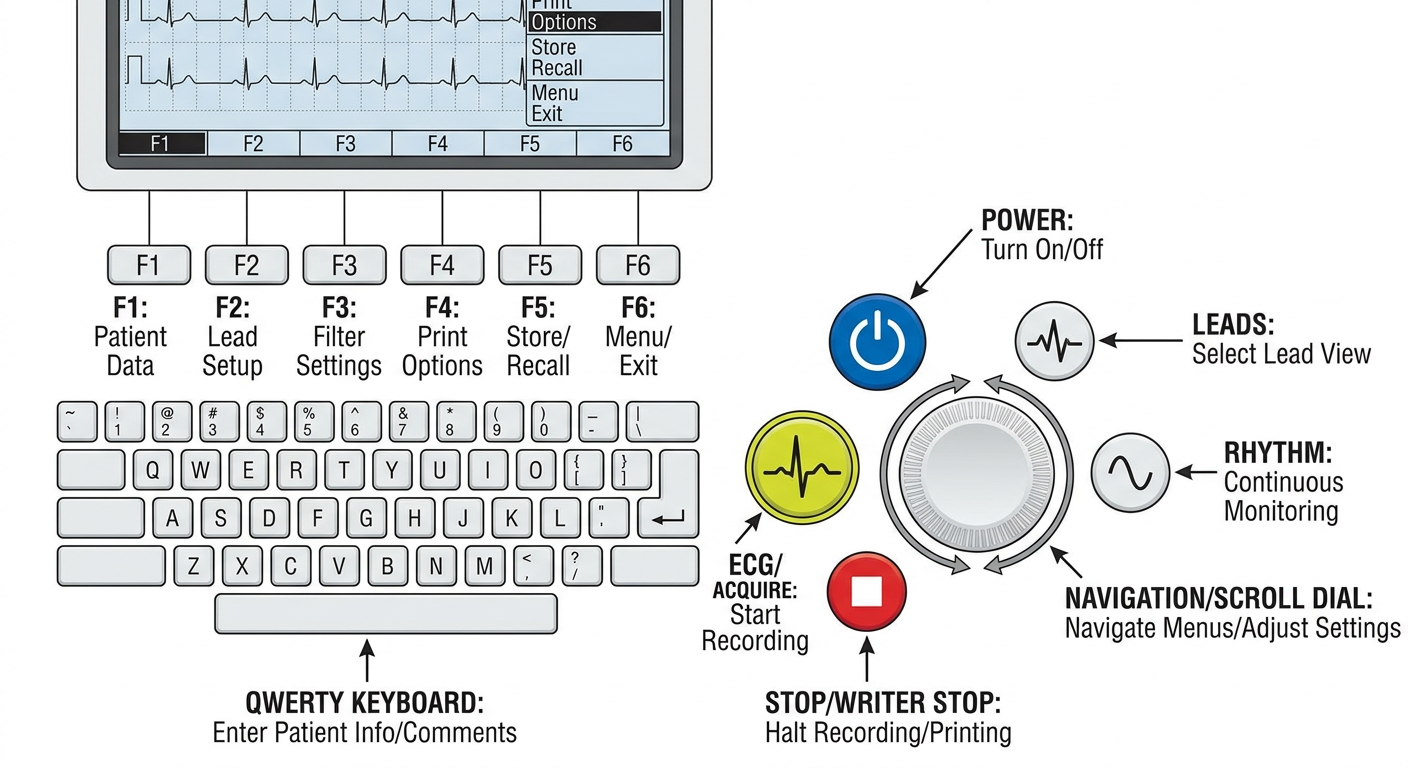
A detailed labeled diagram of an ECG/EKG machine control panel showing all important buttons clearly labeled with arrows: Power button (blue circle with power icon), Leads button (waveform icon), ECG/Acquire button (yellow/green circle with ECG trace icon), Rhythm button (sine wave icon), Stop/Writer Stop button (red circle with stop icon), Navigation/scroll dial, and 6 Function keys at the top of the screen. Below the function buttons is a QWERTY keyboard. Each button has a clear label and a brief description. Clean medical diagram style, white background, professional.
ECG Machine Buttons - Visual Guide
Full Machine Overview (GE MAC 2000)

This is the GE Healthcare MAC 2000 - a standard hospital ECG machine. The color-coded lead wires connect to the 10 electrodes placed on the patient.
Close-Up: The Control Panel Buttons

Button-by-Button Explanation
| Icon/Position | Button Name | Color | What It Does |
|---|---|---|---|
| ⏻ | Power | Blue circle | Hold for 2-3 seconds to turn machine ON or OFF |
| • • (dots) | Battery / AC LEDs | Small indicator lights | Show battery level and whether machine is plugged in |
| ≈~ (two wave symbols) | Filter indicators | Small icons | Show current signal filter status (baseline/muscle/AC) |
| ∿∿ | Leads | Blue circle, waveform icon | Scrolls through lead display formats (3-lead, 6-lead, 12-lead view on screen) |
| ECG | ECG / Acquire | Yellow circle - most prominent | This is the main button - press to start recording and printing the 12-lead ECG |
| ≋ | Rhythm | Blue circle, sine wave icon | Records a continuous real-time rhythm strip (usually Lead II) - prints until you press Stop |
| ⊘ | Stop / Writer Stop | Red circle | Stops all printing and recording immediately |
| ⊙ (dial) | Navigation Dial | Blue circle with dots | Scroll up/down/left/right through menus; press center to confirm selection |
The 6 Function Keys (Top Row Above Screen)

| Screen Label | What It Does |
|---|---|
| Patient Data | Opens screen to enter name, DOB, ID |
| Filter | Change signal filter (muscle artifact, baseline wander, AC noise) |
| Speed | Change paper speed (25 mm/s standard, 50 mm/s fast) |
| Gain | Change amplitude (10 mm/mV standard) |
| Print a stored ECG report | |
| More | Shows additional menu options |
| Delete | Delete a stored ECG |
| Transmit | Send ECG to hospital network/EHR |
Generated Button Diagram Reference
Step-by-Step: Which Buttons to Press in Order
1. POWER button (hold 2-3 sec)  →  machine boots up
2. Function key: PATIENT DATA   →  enter name, DOB, ID
3. Function key: FILTER         →  set to standard (if needed)
4. Function key: SPEED          →  confirm 25 mm/s
5. Function key: GAIN           →  confirm 10 mm/mV
6. [Attach all 10 electrodes to patient]
7. ECG button (yellow)          →  starts 10-second acquisition + auto-prints
   OR
   RHYTHM button                →  starts continuous rhythm strip
8. STOP button (red)            →  stops rhythm strip (if needed)
9. Function key: TRANSMIT       →  sends to EHR (if required)
10. POWER button                →  shut down after use
Key Point to Remember
How to see if ecg strip is correct or not
how to check ECG strip quality correct artifact baseline wander lead reversal
normal vs artifact ECG strip muscle tremor 60Hz interference comparison image
Give me a correct ecg strip image