


I bought the ir plan for jio, how to activate it? It says upcoming and will be activated after another plan ends.. That doesn’t make sense
"IR pack gets auto activated on your first International usage or post consumption of Benefits/Validity expiry of existing active IR pack if any."
- Nothing — just travel. The moment you use your phone internationally, the IR pack activates automatically.
- If you want to be safe, toggle Data Roaming ON in your phone settings before you land.
Can you go through this thoroughly and let me know what are the most important points I should consider and be aware about, and you can ask me any question to test if I am doing the process correctly or not, and also create a flowchart or something like illustration to showcase what steps to take before leaving India.
python3 -c " import pdfplumber with pdfplumber.open('/home/daytona/workspace/attachments/1e50a053-2c1a-4c94-8473-1315f5d47734/IR+User+Guide_10022021.pdf') as pdf: print(f'Total pages: {len(pdf.pages)}') for i, page in enumerate(pdf.pages): text = page.extract_text() print(f'--- PAGE {i+1} ---') print(text) print() "
A clean, modern vertical flowchart titled "Before You Leave India — Jio IR Checklist". The flowchart has a start node at the top labeled "Planning International Travel", then flows through these sequential checklist steps with icons: 1. "Check Country Coverage" — confirm your destination is covered by the IR US Mexico & Australia Pack (USA, Mexico, Australia, Canada covered) 2. "IR Pack Purchased?" — diamond decision box: YES arrow goes down, NO arrow goes right to "Buy IR Pack on MyJio App" 3. "Pack shows in Upcoming tab" — note: auto-activates on first international use, no manual action needed 4. "Disable Call Forwarding" — important warning box in orange: must be OFF or you won't receive calls 5. "Set Network Mode to Auto (2G/3G/4G)" — don't leave it on LTE/VoLTE only 6. "Enable Data Roaming" — iPhone: Settings > Mobile Data > Data Roaming ON; Android: Settings > Mobile Networks > Data Roaming ON 7. "Disable Cloud Auto-Sync" — turn off Google Photos, WhatsApp, Dropbox auto-upload to save IR data 8. "Note Emergency Number Caution" — avoid long-pressing numeric/power keys — can trigger accidental emergency calls abroad 9. "Support Contacts" — green box: Call/WhatsApp +91 7018899999 | Email care@jio.com End node: "Ready to Travel! IR activates on first use abroad" Use a blue and white color scheme with orange for warnings, green for the final node, clean sans-serif font, professional look.
Pre-Departure Checklist Flowchart
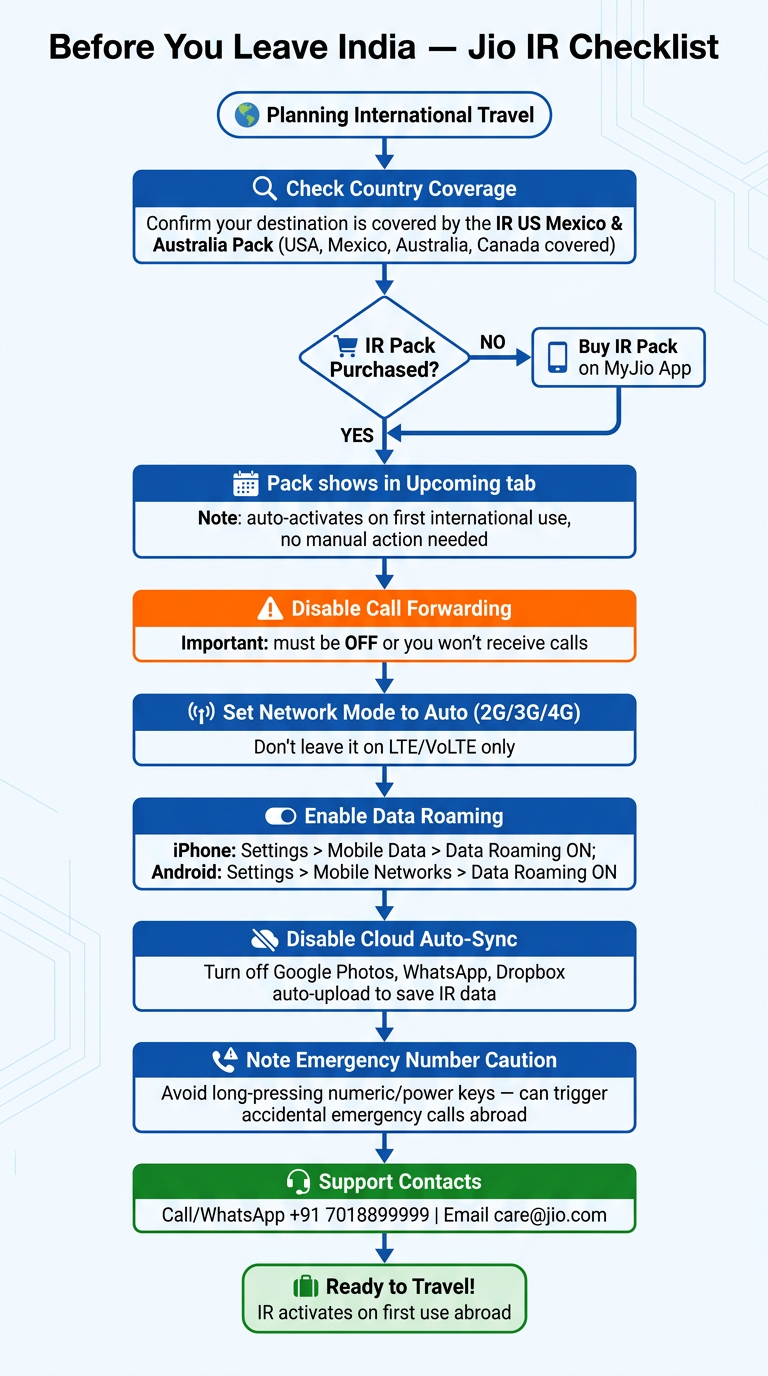
Most Important Points from the Guide
✅ 1. Your Pack Activates Automatically — But Only Once You're Abroad
✅ 2. Countries Covered by Your Pack
⚠️ 3. Disable Call Forwarding BEFORE You Leave — Critical
- iPhone: Settings → Phone → Call Forwarding → OFF
- Android (Samsung): Phone → Settings → Supplementary Services → Call Forwarding → Disable
⚠️ 4. Network Mode Must Be Set to Auto, Not LTE Only
- Android: Settings → Mobile Networks → Network Mode → LTE/GSM/WCDMA (Auto Connect)
- iPhone: Settings → Mobile Data → Network Selection → Automatic ON
✅ 5. Enable Data Roaming
- iPhone: Settings → Mobile Data → [Your SIM] → Data Roaming: ON
- Android: Settings → Mobile Networks → Data Roaming: ON
💡 6. Save Data — Disable Cloud Auto-Sync
- Turn OFF auto-upload in Google Photos, WhatsApp, Dropbox, Google Drive, Facebook
- Use secure Wi-Fi at hotels/airports for heavy usage
💡 7. Wi-Fi Calling — Know the Limitation
⚠️ 8. Emergency Call Caution — Seriously Don't Ignore This
🆘 9. Support if Something Goes Wrong
- Call/WhatsApp: +91 7018899999
- Email: care@jio.com
- MyJio App: Live Chat